Microsoft's New Copilot Explained: Home, Code, and Autopilot
Microsoft's New Copilot Explained: Home, Code, and Autopilot
Microsoft is calling Friday's release its biggest Copilot update ever, and it comes with a small honesty problem: of the three things the new Copilot is named after, none of them is generally available today.
Home and Code go out through Frontier, Microsoft's early-access program, "in the coming weeks." Autopilot is a private preview that opens at the end of September. The one piece that reached general availability on announcement day is a grounding layer underneath called Fabric IQ, which pipes Power BI's semantic models into Copilot's answers. Useful, invisible, not a headline.
So here's what this post is for. First the tour, in plain language: what Home, Code and Autopilot actually are, and what each one changes about a normal workday. Then the part most write-ups skate past — which of these exists in an account you or your company can touch right now, which is a rename, and what the new bill looks like.
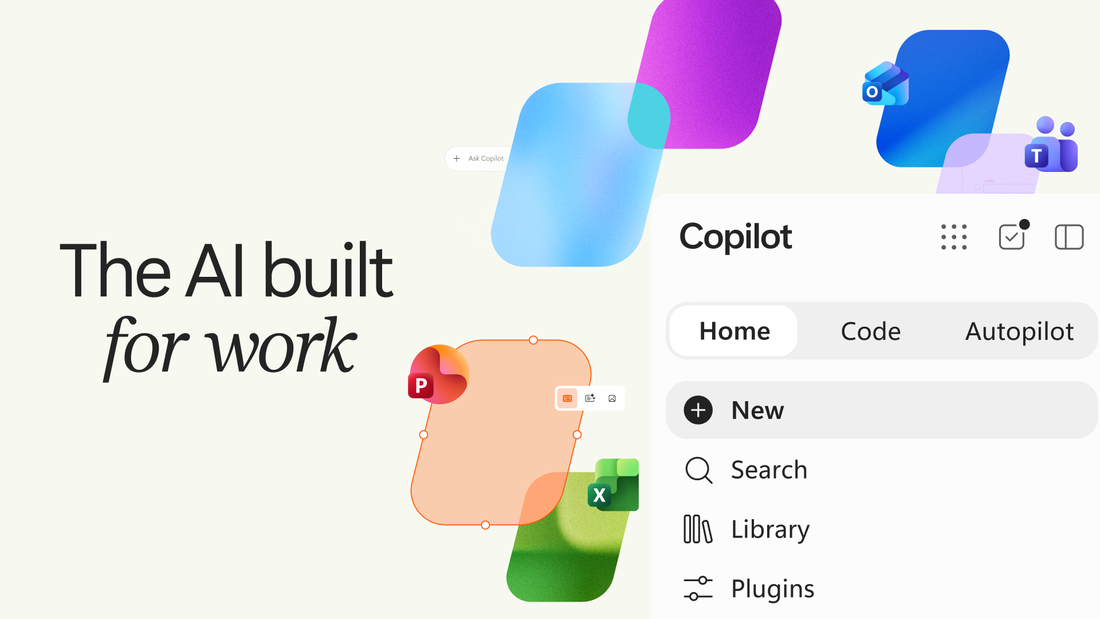
Microsoft's official hero for the new Copilot: three tabs, and the Office apps drawn into the same window. Image: Microsoft.
Home, Code, Autopilot: what each one actually is
Microsoft's own framing is Nadella's, posted the minute the news went live: Copilot as "a new OS for work that spans every model, every form factor, and every task." That is the ambition. The shipped parts are smaller and more concrete, so let's take them one at a time.
Home: one front door, and eventually no mode switch at all
Home is the new starting screen, and its job is to end the Chat-or-Cowork confusion. Chat stays what it was — quick questions, lookups, a first draft. Cowork is the delegated-work mode that went generally available in June: you describe the finished artifact you want (an RFP response, a launch kit, a customer briefing) and it runs end to end. Both now sit behind one prompt box, and from that box you can also reach Office: ask for a launch brief, a budget model or a deck and Copilot creates a real, editable Word, Excel or PowerPoint file that is live for your whole team, not a wall of generated text you paste somewhere.
The change to watch is the one that isn't finished. Microsoft says that soon you won't pick a mode at all — you state what you need and Copilot routes the job to Chat, Cowork or Code on its own. That routing is listed as coming, with no date attached.
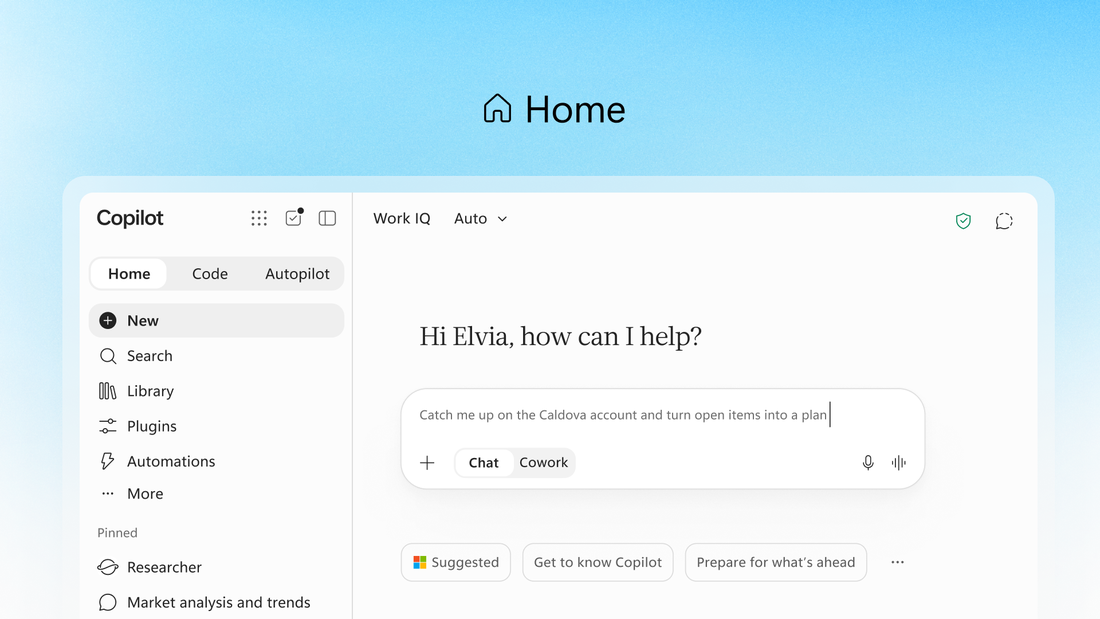
Home, with the Chat / Cowork toggle still sitting under the prompt box. Microsoft says that choice disappears later. Image: Microsoft.
Code: an app builder for people who don't write code
Code is the genuinely new surface, and the most interesting thing in the launch. You describe a tracker, a dashboard, an automation or a small internal app in ordinary language, and Copilot decides on an approach and builds it — a desktop widget, an interactive dashboard, or a cloud-hosted internal app you can share with your team.
Underneath, it runs on the same technology as GitHub Copilot, executes in a sandbox, and gets hosted inside your own tenant through something called Copilot Managed Runtime, which is in preview now. Microsoft is explicit that developers should keep using GitHub Copilot; Code is aimed at the marketing analyst who needs a pipeline dashboard, not the engineer.
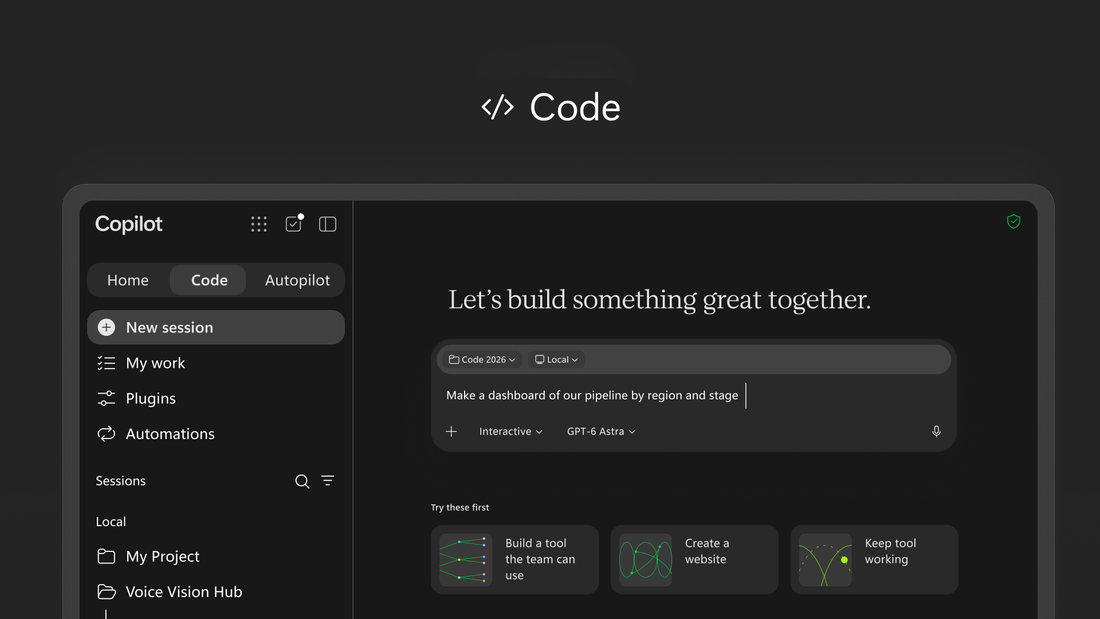
The Code tab, mid-request. Note the model picker at the bottom of the box — in Code you choose, and a Microsoft model is one of the options. Image: Microsoft.
Autopilot: the renamed agent that will make IT sit up
Autopilot is the old Scout, and if you have been anywhere near Microsoft's roadmap this year you already know the shape of it: a persistent agent that keeps working when you close the laptop. You give it a name, a role and a goal. It watches channels, chases threads, runs recurring work and picks a project back up days later without a new prompt. It lives inside your tenant with its own identity, its own memory, its own computer and its own workspace, and you @mention it in Teams or Outlook the way you would a colleague.
Here is my favorite fact in the entire launch, though. Scout was not purely an in-house build. Microsoft's June post about it says the agent is "powered by OpenClaw open-source technology," and that Microsoft contributes policy conformance upstream to that project. If you read my OpenClaw 2.0 post earlier this month, that is the same open-source agent loop — now wearing an Entra identity, Purview data labels and an admin spending policy, and being sold to the enterprise as a digital teammate.
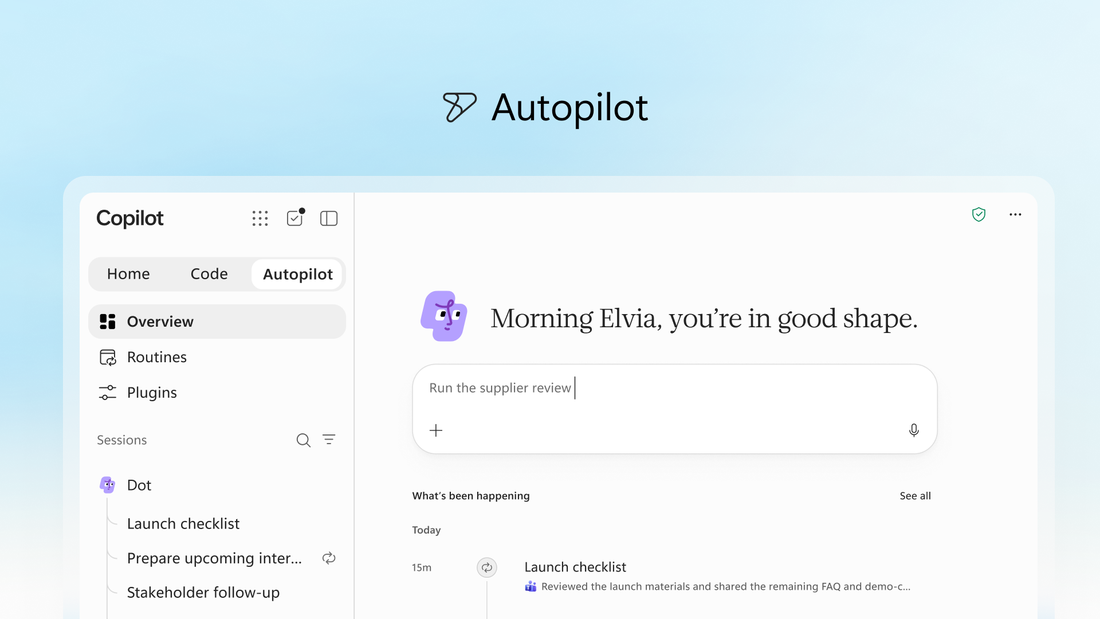
Autopilot's overview, with an agent called Dot running a launch checklist and stakeholder follow-ups. It has its own identity in your tenant — which is exactly why your IT team gets a vote. Image: Microsoft.
What you can actually use today
This is where the launch gets thin, and it is worth being precise about it. Microsoft described a dozen moving pieces on Friday. Exactly one of them is generally available.
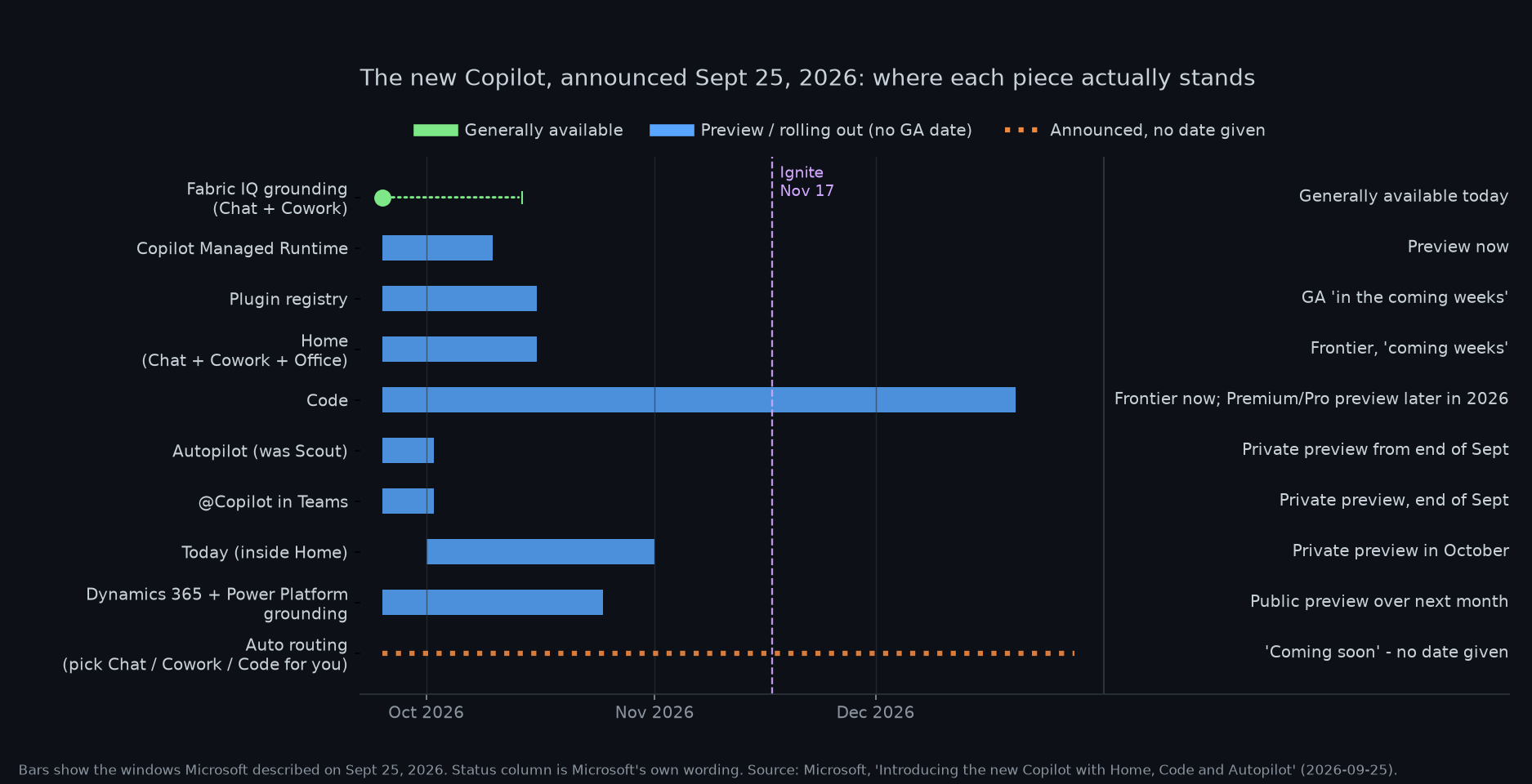
My read of the rollout, using Microsoft's own wording for each status. Source: Microsoft's announcement post, September 25, 2026.
| Piece | What it is | Status on Sept 25 | When you can touch it |
|---|---|---|---|
| Home | Chat and Cowork behind one prompt box, with Office inside Copilot | Frontier rollout | "Coming weeks" |
| Code | Describe an app, dashboard or automation; Copilot builds and hosts it | Frontier rollout | Frontier end of September; preview for Microsoft 365 Premium and Pro subscribers later this year |
| Autopilot | Persistent cloud agent with its own identity, memory and workspace (formerly Scout) | Private preview | End of September |
| @Copilot in Teams | A Copilot the whole channel or meeting shares, with that space's context and permissions | Private preview | By end of September |
| Today | A daily briefing inside Home: mail, calendar, threads, tasks, with drafts already written | Private preview | October, then Outlook and Teams |
| Copilot Managed Runtime | Governed hosting so apps built in Copilot run inside your tenant | Preview | Available now, in preview |
| Fabric IQ grounding | 20M+ Power BI semantic models wired into Chat and Cowork | Generally available | Now |
| Dynamics 365 + Power Platform grounding | Deal history, support tickets and workflows pulled into answers | Public preview | Rolling out over the next month |
| Plugin registry | One catalogue for Microsoft, partner and custom plugins, governed by IT | Rolling out | GA across surfaces "in the coming weeks" |
| Auto routing | Copilot picks Chat, Cowork or Code for you instead of asking | Announced only | No date given |
The consequence is practical: if your company isn't enrolled in Frontier, your Copilot looks almost exactly the way it did last week. And this is a work story, not a home story. Microsoft merged the consumer and workplace versions of Copilot into one product pointed at corporate buyers, and Bloomberg's read is blunt: Microsoft is ceding the personal-chatbot market to OpenAI, Google and Meta, whose Muse app has been sitting at the top of the App Store.
There is a consumer path — Frontier has a track for individual Microsoft 365 subscribers — but almost nothing in Friday's announcement was designed for you if you just want a better assistant at home.
The rebrand tax
Before the feature list, a word about the name on the box, because it has moved more than the product has.
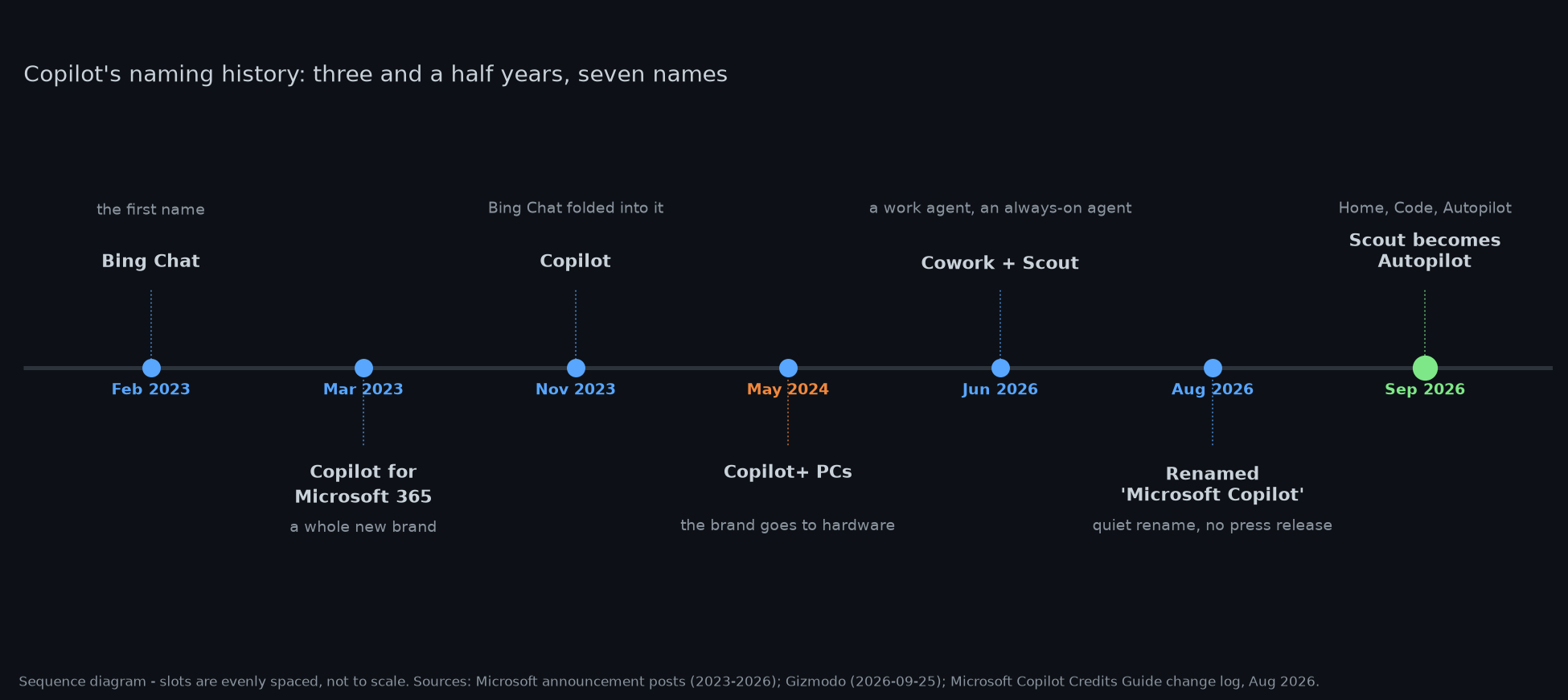
Every name this product has carried in three and a half years. Microsoft's own credits guide quietly records one of these: "Microsoft 365 Copilot" became "Microsoft Copilot" in August 2026.
Bing Chat, Copilot for Microsoft 365, Copilot, Copilot+ PCs, Cowork, Scout, and now Autopilot as a third tab. Microsoft has also spent the past few weeks pulling Copilot+ branding back off its newest Surface PCs, and the internet noticed the pattern. On Hacker News, someone who says they manage this stack for local-government organizations in Australia described the current state of enterprise Copilot confusion and finished with a line I keep coming back to:
"This just seems like throwing a new mask on the product to cover the mess underneath."
Fair, and Microsoft handed people more ammunition by reusing a word that was already taken. Autopilot has meant device provisioning in Windows for years, and GitHub Copilot has an agent story of its own, so Microsoft now ships three different things called Autopilot. That is the kind of detail that costs an admin twenty minutes in a meeting.
It isn't all one-sided. A GHD executive told CNBC he is excited about exactly the part I find most interesting, "because it makes GitHub-like capability simpler for more people to use." GHD has given Copilot to 12,000 employees. About 200 of them are experimenting with Cowork. Hold both numbers in your head at once — that ratio, not the 12,000, is the honest state of enterprise agent adoption.
One licence, two meters: what this actually costs
Beneath the interface, Friday's real change was commercial, and Microsoft said so more plainly in its pricing post than in the launch post: "Think of our commercial model as a plug-in hybrid." The battery is the per-seat subscription everyone already understands. The gas tank is a credit meter for the work agents do on their own.
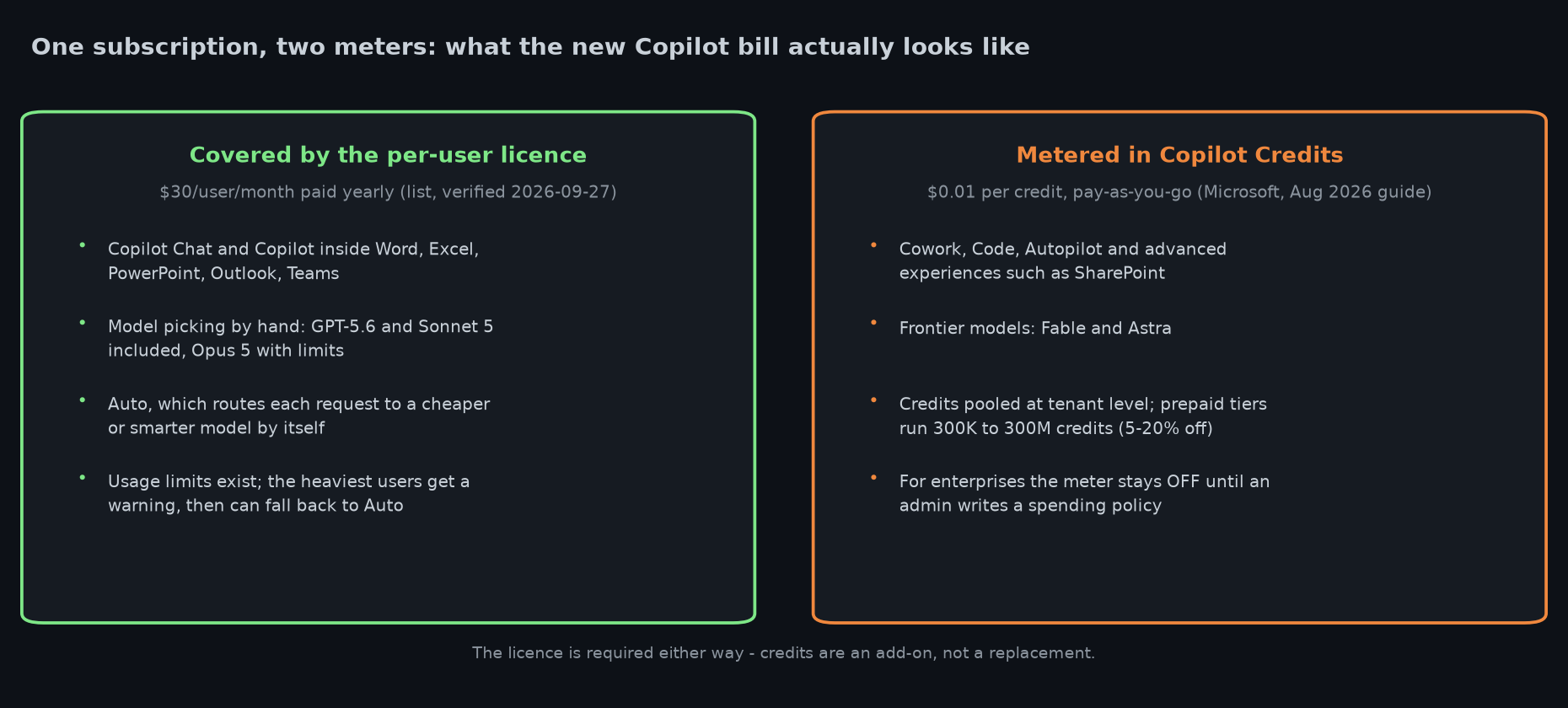
What sits on the fixed licence and what sits on the meter. Sources: Microsoft's pricing post (Sept 23, 2026), its Copilot Credits Guide (Aug 2026) and its Copilot pricing page, checked today.
The licence is $30 per user per month paid yearly, or $31.50 monthly, on top of a qualifying Microsoft 365 plan — I checked that price on Microsoft's own page today, because it did not change in this announcement. What it covers is Chat, Copilot inside Word, Excel, PowerPoint, Outlook and Teams, hand-picking a model, and a routing mode called Auto that weighs accuracy, speed and cost on every request. GPT-5.6 and Sonnet 5 are included; Opus 5 is included with limits.
Everything agentic runs on Copilot Credits instead: Cowork, Code, Autopilot, advanced experiences like SharePoint, and the frontier models Fable and Astra. Credits are $0.01 each on pay-as-you-go, pooled at tenant level, with prepaid tiers from 300,000 credits (5% off) to 300 million (20% off). Microsoft's own guide admits the per-task numbers it publishes are "rough planning estimates," and the launch post did not include credit rates at all.
One genuinely good design decision: for enterprises, the meter stays off until an administrator writes a spending policy in the Microsoft 365 admin center, and nothing is billed before that. Admins can cap spending per tenant, per group and per user, and route credit requests through normal approval flows. Set those policies before you open the tap — that is the one piece of advice worth taking from this entire launch.
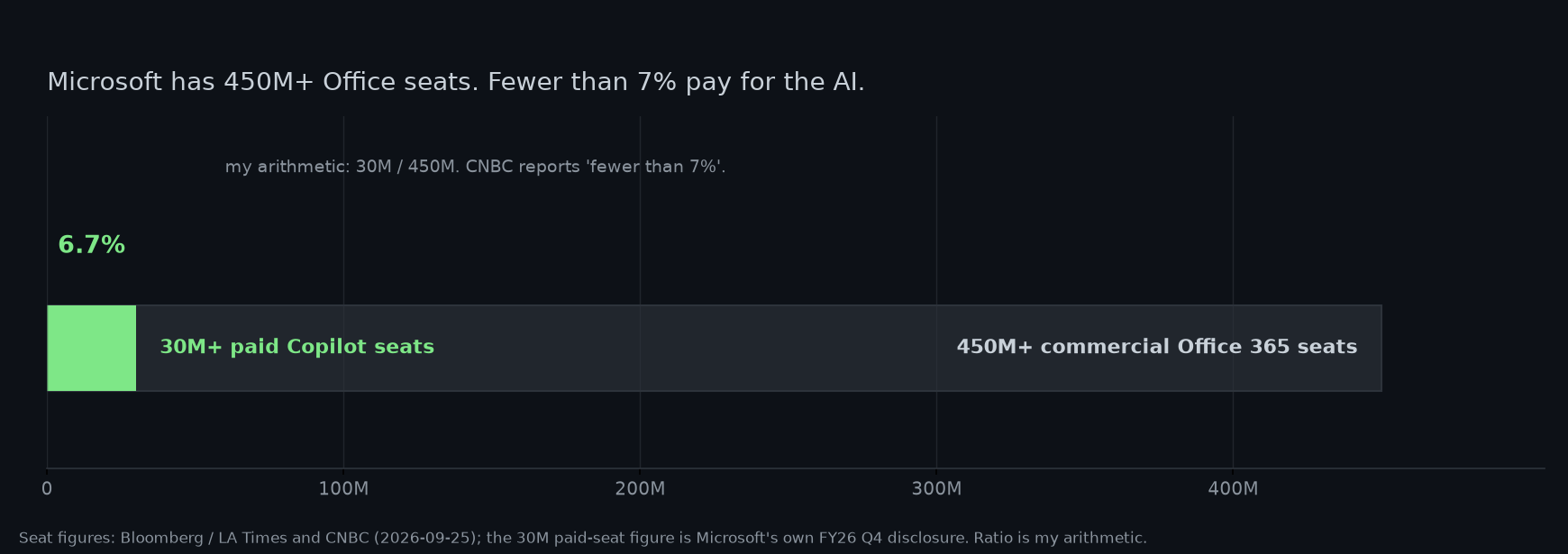
Why the commercial model had to change: the AI add-on is on fewer than 7% of Microsoft's commercial Office seats. Reported figures; the ratio is my arithmetic.
The economics explain the strategy. More than 30 million people pay for Copilot as of the end of June, against 450 million-plus commercial Office 365 seats, which CNBC puts at fewer than 7% penetration. A flat seat fee for that installed base does not pay for agents that grind through a task for an afternoon, so the work that costs real compute moves onto a meter. Microsoft's executive vice president for Copilot, Jacob Andreou, put the priority plainly to CNBC: "This product is at its best when it's just optimizing for user value and for the quality of the output." Cost efficiency, he said, is less important. Which is fine, as long as you know who is paying per mile.
Why Microsoft is doing this now
Because the enterprise is the only place it still has an advantage, and because Anthropic has been taking that ground. Microsoft bundles Copilot into software that hundreds of millions of people already use; it does not have to win a download war. What it has to do is make the thing worth paying for beyond the chat box, and that means agents that actually complete work inside the tenant — governed, auditable, and billed.
Andreou also said the quiet part out loud at the Seattle preview: "The problem is that these agents have been almost impossible to bring into the enterprise." He acknowledged to CNBC that adding coding to Copilot is Microsoft playing catch-up. You rarely get that sentence from an executive on the record, and it tells you more about the road map than the marketing page does.
So should you care yet?
Depends who you are, and the honest answer is different for each of you.
- If you run IT for a Microsoft shop: yes, now — not for the features, but for the spending policies and the Frontier enrollment decision. Both are admin-side switches, and the meter is the thing that will surprise people.
- If you use Copilot at work: Code is the piece likely to change your week, and it arrives last. Watch for whether your tenant is in Frontier.
- If you want a personal AI assistant: not really. This launch was aimed at buyers, and Microsoft has effectively left that race.
- If you write software for a living: keep GitHub Copilot. Microsoft says so itself.
My take
This is the most coherent Copilot strategy Microsoft has published, and the least testable. Consolidating Chat, Cowork, Office, Code and agents into one app with one bill fixes a real problem — nobody could keep the modes straight — and the pricing split is the correct shape for agentic work, because a task that runs for three hours genuinely costs more than a question that takes three seconds.
But 90% of it is preview, and the two features that matter most are the two nobody can try yet. Code's "broad availability in the coming weeks" is the sentence to hold Microsoft to, along with the promised preview for Microsoft 365 Premium and Pro subscribers later this year. Autopilot's credit burn is the number to watch, because no one has published one yet.
I'll update this when there's something real to measure: when Code reaches regular subscribers, when the first admin posts an actual Autopilot bill, and after Ignite in San Francisco on November 17–20, where Microsoft has already said the roadmap continues. If a demo on that stage comes with real numbers instead of a summary slide, that is the moment this becomes reviewable rather than announced.
Sources
Microsoft: Introducing the new Copilot with Home, Code and Autopilot (Sept 25, 2026) · Evolution of the Copilot pricing model · Building the system for AI at work · Usage-based billing and Copilot Credits · Copilot Credits Guide (Aug 2026) · Introducing Microsoft Scout (June 2, 2026) · Copilot enterprise pricing page (checked Sept 27, 2026) · Frontier program
Press: Bloomberg / LA Times, "Microsoft abandons personal AI chatbot race with Copilot reboot" (Sept 25, 2026) · CNBC, "Microsoft packages business AI in single app as it tries to compete with Anthropic" · Gizmodo, "Microsoft Thinks It's Finally Figured Out Copilot This Time" · TechPowerUp on Nadella's "new OS for work" framing · Satya Nadella's launch thread on X (Sept 25, 2026) · community reaction quoted from Hacker News threads under the Bloomberg story (Sept 25–26, 2026).
Charts are mine, built from the sources above; vendor and reported figures are labelled as such. I have not used Code or Autopilot myself — neither is available outside Microsoft's preview programs — so nothing here is a hands-on verdict. The 6.7% figure on the seat chart is my own division, not a published number.
Comments
Post a Comment