DARKROOM: Resize the Image Without Losing the Wrong Part
BROWSER TOOLS
DARKROOM: Resize the Image Without Losing the Wrong Part
A square crop and a smaller whole photo are different exports. DARKROOM puts those resize choices in the browser so the result can be inspected before download. The transparent-PNG check below shows a reproducible case, with format and dependency limits left visible.
In this article
Open DARKROOM in a full-size tab
Image resize · format conversion · batch processing — all inside your browser
Open the embedded tool preview
The tool performs image conversion in the browser. That describes the processing path, rather than a guarantee that the page makes no network requests. The reproducible PNG check below also records the external-dependency limitation.
Everyday image operations
Resize
Format conversion
Batch processing
Compare the result
Local processing and network limits
A single HTML interface
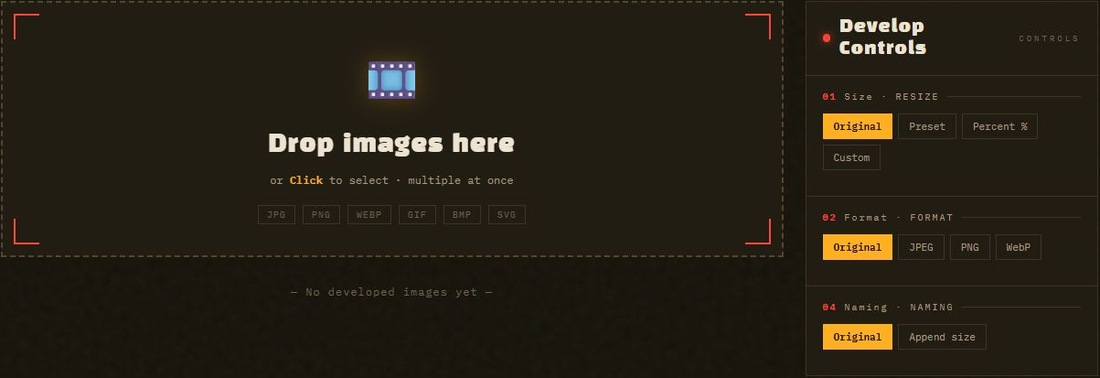
Import, adjust and inspect
Inputs, exports and limits
| Form | Single HTML interface — no application installer; external font and JSZip dependencies |
| Formats | Input: JPG · PNG · WebP · GIF · BMP · SVG · AVIF / Output: JPEG · PNG · WebP |
| Resize modes | Original / 7 presets / percent / custom (aspect lock, cover · contain · exact) |
| Batch | Unlimited multi-file, auto re-convert on setting change, ZIP download |
| Privacy | Local image conversion; initial external dependencies must load. |
| Browsers | Chrome · Edge · Firefox · Safari (Canvas API + createImageBitmap) |
| License | MIT — use, modify, distribute freely |
The interface
A "photo developing lab" concept. A dark room where only the safelight glows red. The metaphor of "developing" images runs through the whole UI.
Choose a resize mode with a concrete example
A 4032 × 3024 photo has a 4:3 ratio. To publish it at 1600 pixels wide without distortion, enable the aspect lock: the matching height is 1200 pixels. Pixel count falls from 12,192,768 to 1,920,000, a calculated reduction of about 84.3 percent. This is a pixel calculation, not a measured file-size saving; compression and image detail affect bytes.
For a square thumbnail, “cover” fills the square by cropping part of the photo, while “contain” keeps the whole image with unused space. “Exact” can stretch an image when the target ratio differs. Check the comparison preview before downloading, especially for faces and text near an edge.
JPEG does not retain transparency, so choose its fill color deliberately or export PNG/WebP when transparency is needed. A low quality setting may reduce bytes but can damage small lettering. Process a small batch first; “unlimited” file selection is bounded in practice by browser memory. Keep the original files.
Correction: the default HTML loads Google Fonts and JSZip from CDNs. Image conversion happens in the browser, but a fresh offline session is not guaranteed until those dependencies are bundled or available. This update is a source review and worked calculation; no independent image-quality benchmark was run.
Linked source documents
Related tools: Jebonso’s TXT-to-EPUB guide. See Start Here for the complete tool collection and reading paths.
A conversion you can reproduce
On October 9, 2026, an automated browser check ran the public tool in Chromium 154.0.8037.98 on Windows. The input was a generated 320 × 200 RGBA PNG: solid red and blue rectangles with a transparent right edge. Custom width was 160, aspect lock stayed on, height was left blank, and output format was PNG.
The downloaded file was 160 × 100 pixels in RGBA mode. A pixel inside the right edge still had alpha 0. Input size was 760 bytes; output size was 786 bytes. This tiny fixture became 26 bytes larger despite having fewer pixels, so smaller dimensions do not guarantee fewer bytes. That is an observed result for this file, not a compression benchmark.
To repeat it, open DARKROOM, use a copy of a transparent PNG, choose Custom, enter only the width with aspect lock on, select PNG, and download. Inspect dimensions and transparency in a separate image viewer. JPEG, animated GIF, batch ZIP and visual quality were not tested in this check. The browser page can load external dependencies; this test does not establish zero network traffic.
Comments
Post a Comment