MiniMax H3's 4B Encoder Swap: One 1080 Ti Experiment
MODELS & COSTS
MiniMax H3's 4B Encoder Swap: One 1080 Ti Experiment
The encoder swap solved a concrete setup problem on this 11GB card, but the controls are the part worth inspecting. With one prompt and seed, the learned projection produced the intended scene while the zero and identity matrices did not. That is a small result, with a useful boundary.
In this article
The encoder being replaced
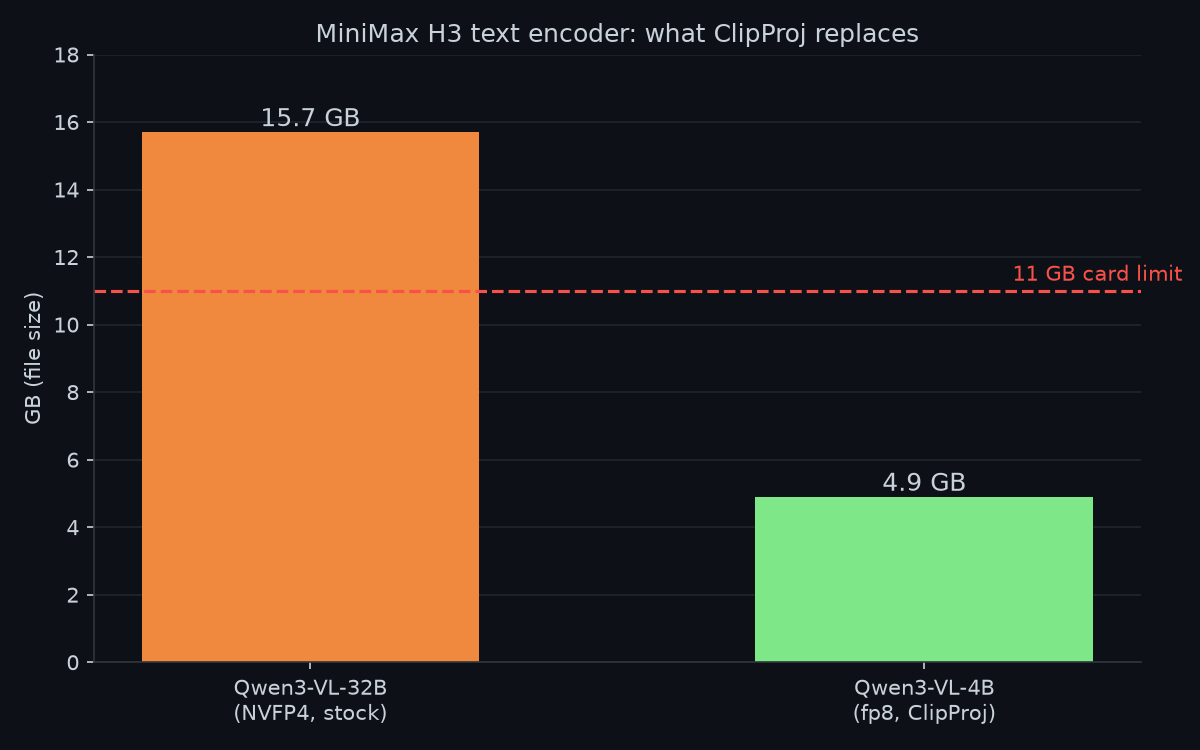
The baseline encoder is Qwen3-VL-32B truncated to 50 layers, with 15.7GB of NVFP4 weights producing a [seq, 5120] conditioning tensor. That exceeds the card's 11GB VRAM before accounting for the video model. It explains why encoder placement was worth testing on this setup; other machines may have a different bottleneck.
ClipProj, an MIT-licensed project by NicoLab28, uses a 4.9GB Qwen3-VL-4B encoder and a learned 2560-to-5120 projection. A shared tokenizer gives aligned token positions for fitting the map. The calibration uses ridge regression on paired representations: a small fitting procedure, rather than full retraining of the encoder or video model.
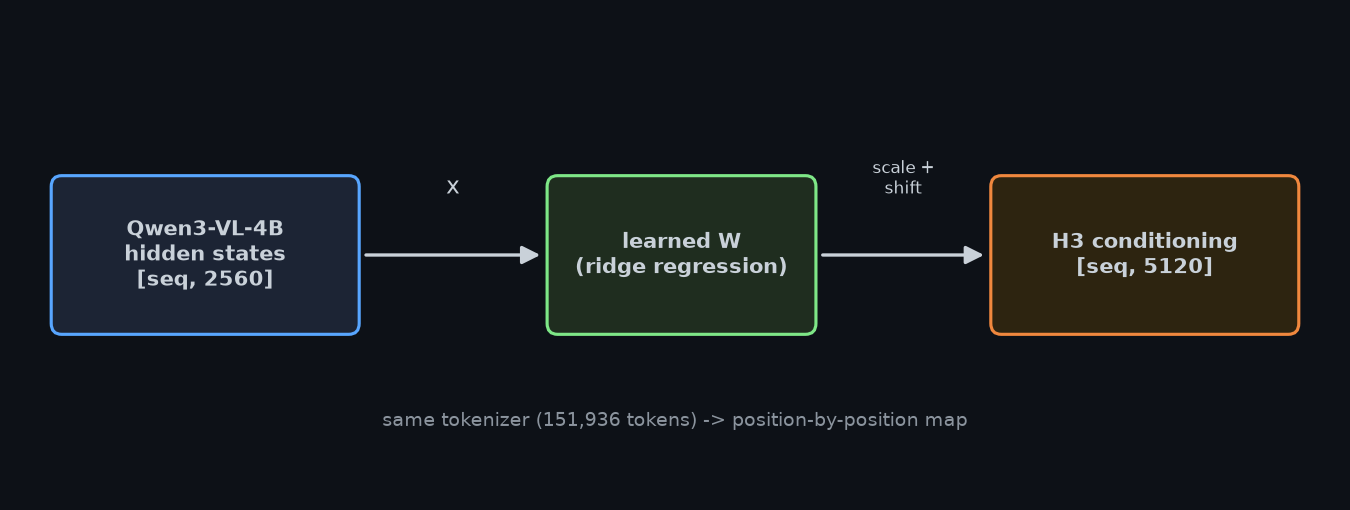
The authors were refreshingly honest about the numbers: test cosine 0.71, R² 0.51, and an explicit "this is a proof of concept." A cosine of 0.71 sounds bad until you learn the DiT tolerates far more error than the metric suggests. I wasn't going to trust any of it — I have a GPU and a test prompt.
The verification: "a red ball on a wood table"
The project ships two control matrices alongside the real one, specifically so you can prove the learned matrix is doing the work and not the diffusion model hallucinating compliance. Same prompt, same seed, only the matrix changes:
| Matrix | What "a red ball on a wood table" produced |
|---|---|
| Zero control (W = 0, no prompt info) | A countryside landscape — prompt completely ignored |
| Identity control (raw 4B dims, no learning) | A golden object in flames — unusable |
| Learned matrix | A red ball on a wood table |
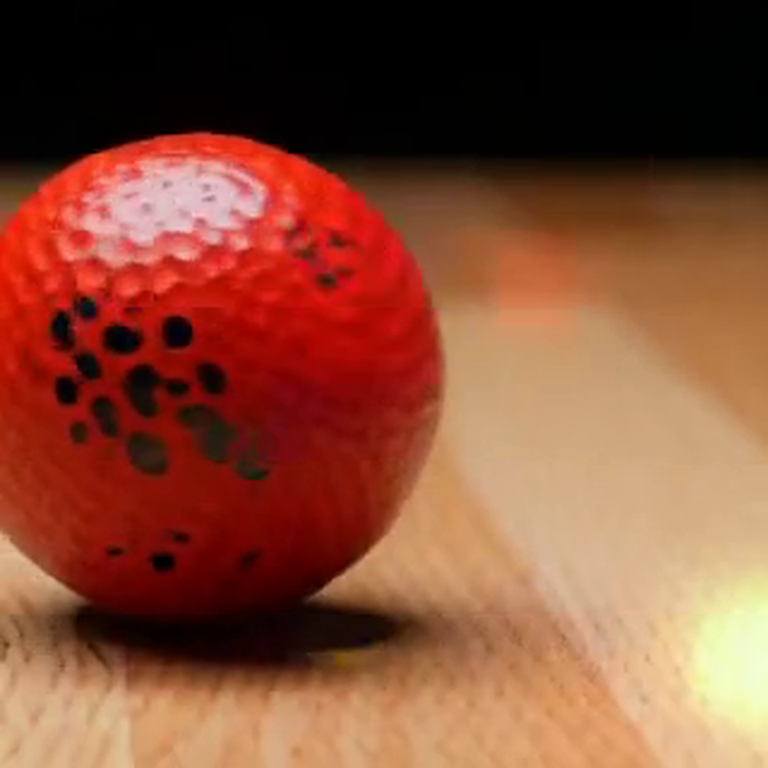

The loader reported cos_test 0.8450 for this matrix. That logged value describes the supplied projection evaluation, while the red-ball controls show one end-to-end example. The controls support the narrower observation that this learned matrix affected this generation; they do not establish general projection accuracy.
Timing and offloading on the 1080 Ti
My first headless run was a disaster: 18 minutes per sampling step at a modest resolution. That's ~10x slower than my normal H3 runs, and I spent hours chasing it — GPU clocks fine, no throttling, same install, same workflow shape. The culprit turned out to be which VRAM mode ComfyUI picked at model-load time, and it split into two separate discoveries:
- Normal mode (async weight offloading): fast — 43s per step at 0.1MP. But the turbo LoRA fails to patch: ERROR lora ... Allocation on device on a dozen blocks every step. The video would have been generated WITHOUT the LoRA — invalid turbo output.
- Lowvram mode: the mode my Desktop app has been using all along. LoRA applies cleanly, output is valid — at ~151s per step, which matches my usual pace.
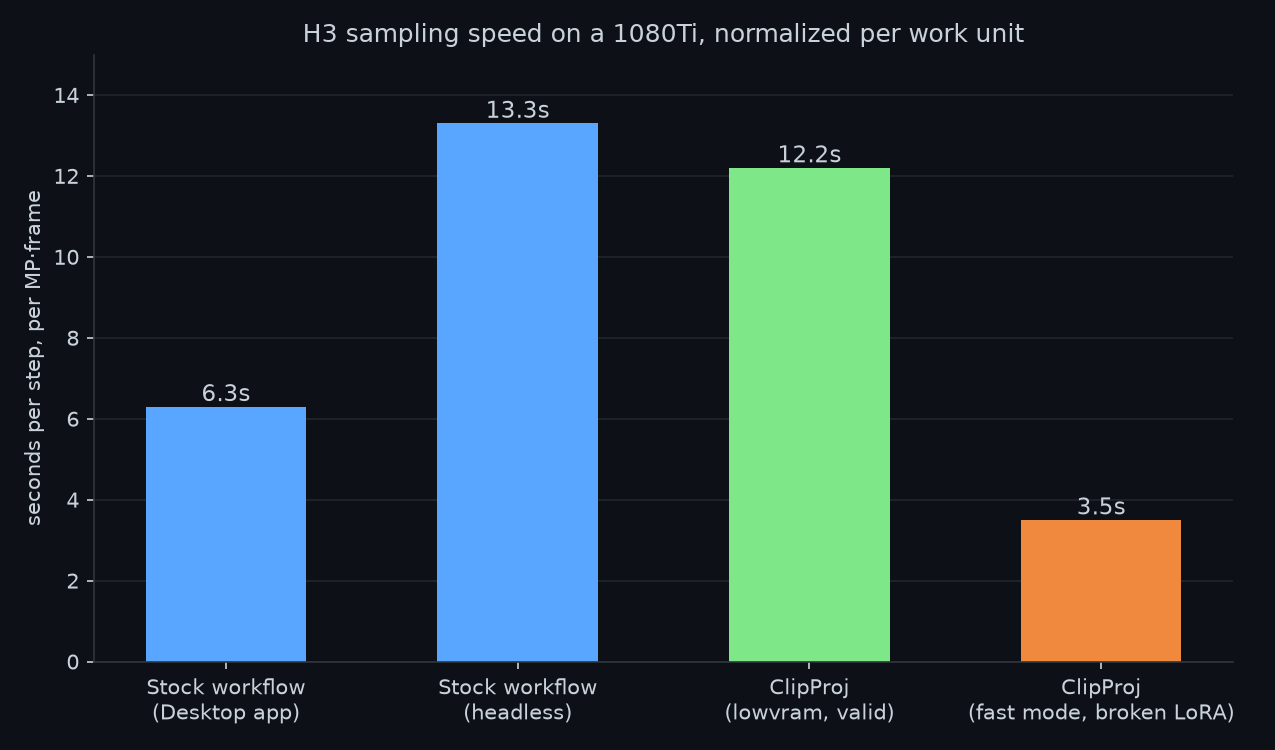
The faster mode failed to apply the turbo LoRA, so it is not a valid speed comparison with the working low-VRAM run. I kept the configuration where the patch applied correctly. Any future speed claim needs the same prompt, output settings and successfully applied LoRA in both runs.
Observed losses and test limits
1. Named references vanish. The 4B stores far fewer facts than the 32B. In the author's tests one famous actor rendered correctly while another became a generic figure. No projection can restore knowledge that was never encoded. Fix: describe instead of name — "the actress X as [role], blonde, blue eyes" survives; the bare name often doesn't.
2. Non-English speech degrades. The audio branch of the DiT is far more demanding than the video branch. English lines reconstruct fine; French (their test) came out phonetically broken. Korean voice work would be the first thing I'd A/B before trusting this for real projects.
This remains a proof of concept on a small set of configurations. The developer reports that eight times more calibration data improved cosine similarity by only 1.8%. A nonlinear projection is a possible direction to test, not a demonstrated solution to the observed losses.
What this experiment supports
The swap is most relevant when the encoder's placement is a measured bottleneck. An 11GB result does not establish a recommendation for every 12GB, 16GB or 24GB card. The video model, precision, context and offload path all affect memory use, while named-reference and speech quality need their own comparisons.
The controls are the strongest part of this small test: the zero and identity matrices fail, while the learned projection produces the intended red ball on a wood table. One prompt does not establish general prompt fidelity, Korean speech quality or production reliability. It is a reason to extend the test set, not to treat the encoder swap as lossless.
If you try it: put the .safetensors matrices in ComfyUI/models/clip_projections/, load the 4B encoder on CPU with dynamic mode, and run the zero/identity controls first — the README walks through it. Project: github.com/nicolab28/ComfyUI-ClipProj.
All numbers measured on my machine (1080Ti 11GB, ComfyUI 0.30.2, turbo LoRA 10 steps), Aug 10 2026. The MiniMax H3 setup post is on this blog if you want the baseline.
Related on this blog: MiniMax Music 3: Five-Minute Songs, Open Weights, One $20M Catch · MiniMax H3 went open-weight, so I did the math on whether my PC can run it
Comments
Post a Comment