Open Minis: Local iPhone Tools and a Separate Model API
AGENTS & WORKFLOWS
Open Minis: Local iPhone Tools and a Separate Model API
An iPhone shell can operate local tools while still sending model requests to a remote provider. Open Minis combines those two paths. The app's permissions and the selected endpoint's data handling matter more than describing the entire workflow as simply local or free.
In this article
The bridges cover frameworks such as HealthKit, HomeKit, Calendar, Reminders, Photos and Vision OCR. Supported model paths include named providers and OpenAI-compatible endpoints, using the user's API key. Local tool execution and remote model inference are different parts of the data flow.
The app is described as free and GPLv3-licensed. A chosen model endpoint can still charge for inference and receive request data under its own terms. Check the app's current privacy notice and each integration before granting access; this article does not audit data collection.
MacStories' one-line summary is the best I've seen: "what would happen if you rolled Claude Code and OpenClaw into one intuitive agentic experience designed for Apple users." Viticci called it "the most impressive indie app I've seen in a while." I want to explain why that's not hype — and also where the "it controls my iPhone" talk stops being true, because that part matters.
A shell and framework bridges
Every AI wrapper app can talk to a model. That's table stakes. What Minis does differently is give the model a real computer to work with — the same way Claude Code on a Mac can do anything by virtue of running in a terminal.
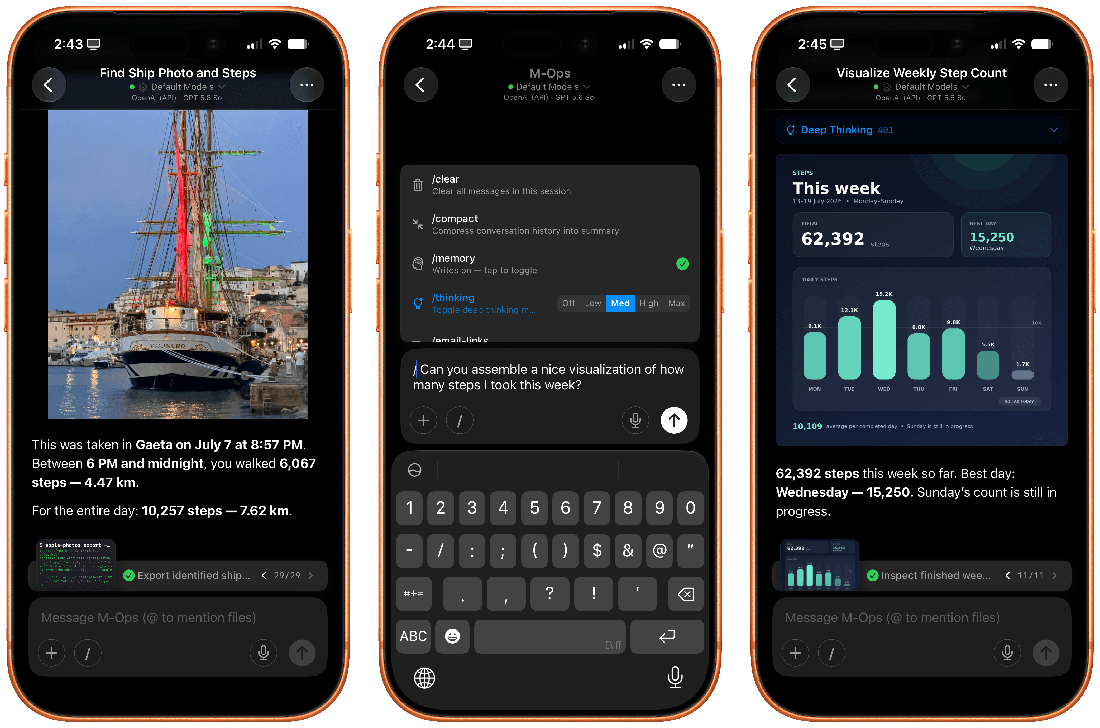
The agent loop in action. (screenshot: MacStories)
Under the hood it runs a fork of iSH, an ARM64 Linux emulator, booting a persistent Alpine Linux environment inside the app's sandbox. The agent can apk add ffmpeg, run Python, use git and SSH, write scripts, process files. There's a whole Linux filesystem that shows up in the Files app as a file provider — and you can bookmark folders outside the sandbox too, so the agent can read and write anywhere you allow.
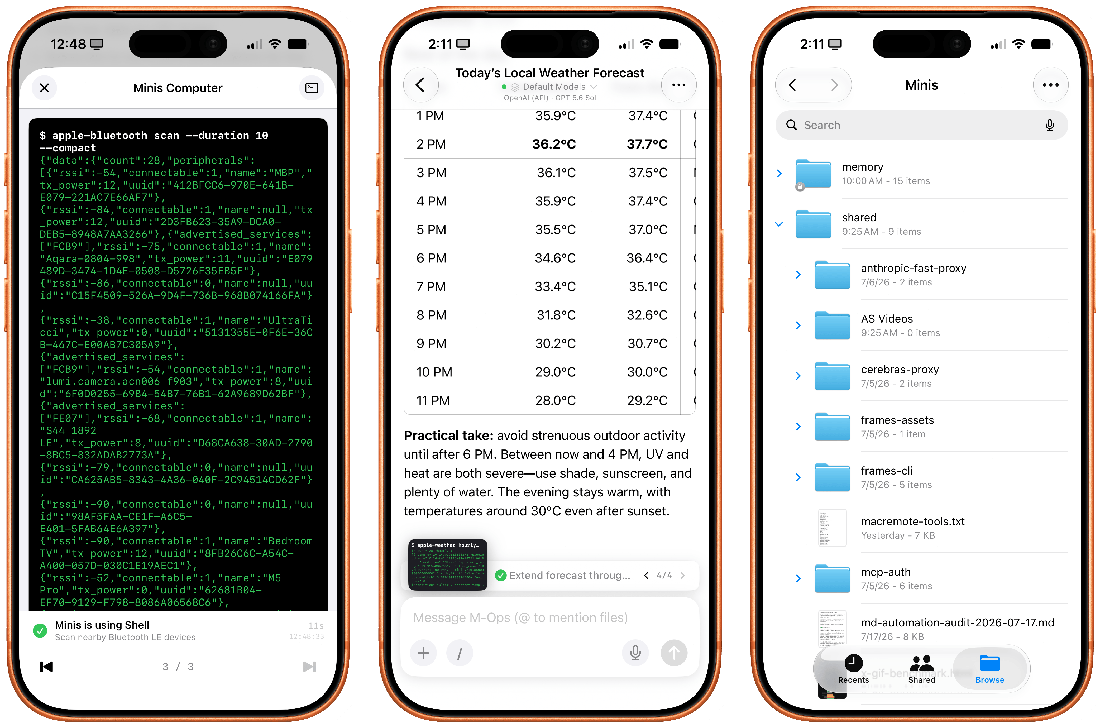
A persistent Alpine Linux shell + dedicated Files workspace, both inside the app. (screenshot: MacStories)
The Apple integrations are the second trick: each one is a dedicated CLI bridge. EventKit, MusicKit, HomeKit, HealthKit, Photos, Vision, speech, clipboard — all exposed as command-line tools a model can call. Ask "what was the temperature in my living room last night?" and it runs a real HomeKit query through a CLI, then formats the result for you.
On top of that: a built-in WebKit browser (navigate, fill forms, screenshot, extract), MCP server support (HTTP and stdio, with Claude Desktop config import), a skills system that accepts standard SKILL.md files — the developer says skills written for Claude, Codex, OpenClaw or Hermes Agent generally run as-is — and persistent memory built on plain Markdown files.
The boundary of iOS permissions
This is where I have to slow down, because the hype around this app (and around the whole "phone agent" category) outruns what iOS physically allows.
What Minis CAN do on iOS:
- Read and write your Health data (steps, heart rate, sleep, workouts)
- Create calendar events, manage reminders and alarms
- Control HomeKit lights, scenes, sensors
- Search and export from Photos
- Read the clipboard, scan NFC, use OCR and speech recognition
- Browse the web, fill forms, take screenshots inside the app
- Open other apps that support URL schemes (Maps, Settings, Safari)
What it CANNOT do on iOS: tap through other apps' interfaces like OpenClaw does on a desktop. iOS sandboxing makes cross-app UI automation impossible for third-party apps — Apple reserves that for itself. "Open WhatsApp and send this message" won't work on an iPhone. This is a hard platform wall, not a missing feature.
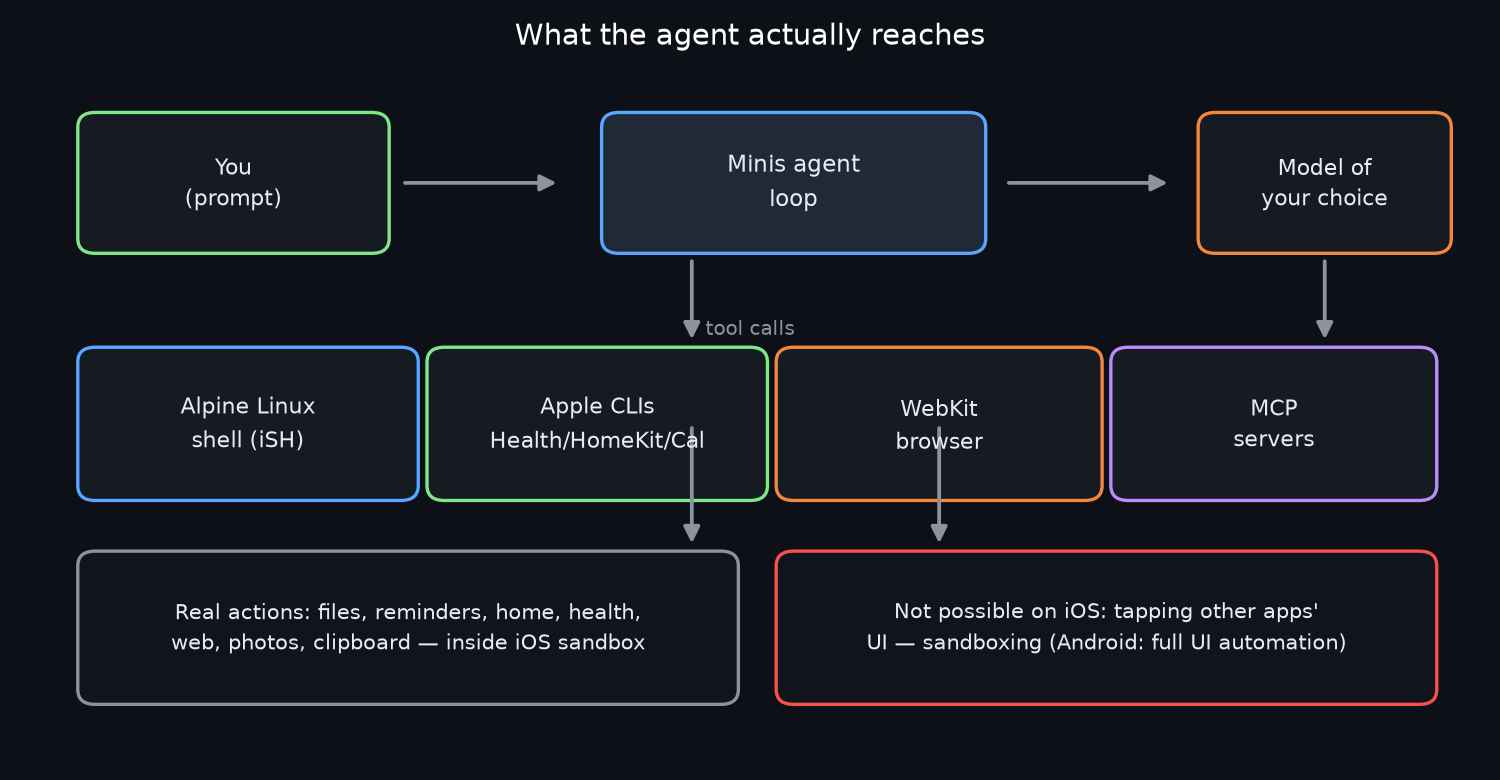
What the agent actually reaches on iOS — deep, but sandboxed. (author's diagram)
The funny part: the Android version is a completely different story. It uses the Accessibility Service to read UI trees and tap buttons across apps, plus Shizuku for adb-level privileges — install/uninstall packages, grant permissions, execute shell commands. That's the "OpenClaw on a phone" experience, and it only exists on Android.
So when someone says "it controls your iPhone like OpenClaw" — the accurate version is "it controls everything iOS lets a third-party app control, which turns out to be a lot more than you'd expect." Photos, health, home, calendar, files, web: useful territory. But other apps' UIs are off-limits. Keep that in mind before you get your hopes up.
It can reconfigure itself
Here's the part that made me grin. Because the agent has shell access to the app's own configuration, you can ask it to change the app itself — and it will pop a native permission screen and do it.
Want a new model provider added? Ask. Want an MCP server wired in? Ask. Need to store an API token? It opens the Keychain-backed credentials page, not plaintext storage. There's even a minis-config CLI with audit and revert. Viticci demonstrated installing his own CLI tool from GitHub into the app by just… giving it the repo link — the model pulled dependencies, installed them, imported the skill, and was working in a minute.
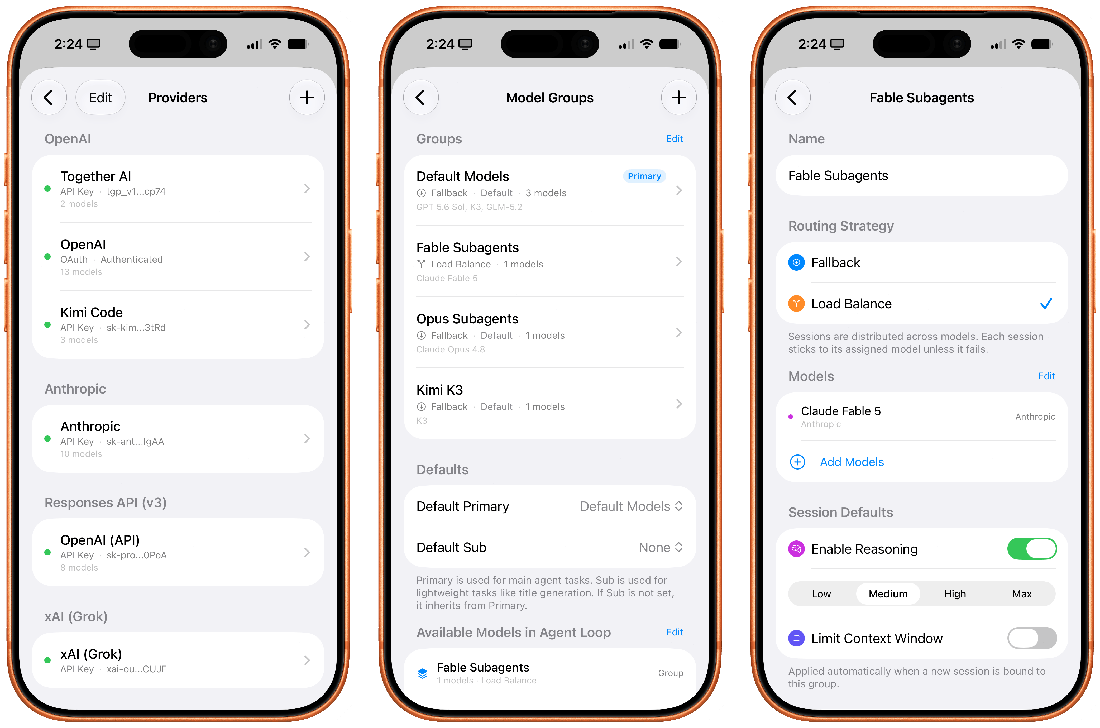
Providers, model groups, and subagents — all configurable by talking to the agent. (screenshot: MacStories)
There are also model groups (fallback or load-balanced routing), subagents you can assign per-task, and a separate pool of "agent loop" models the agent itself can delegate to. This is Claude Code-grade configuration harness, in an iPhone app.
Bring-your-own-key economics
Because you bring your own API key, the running cost is entirely your choice — and the spread between models is enormous. Cost per test run, weighted (source: Artificial Analysis, Aug 2026):
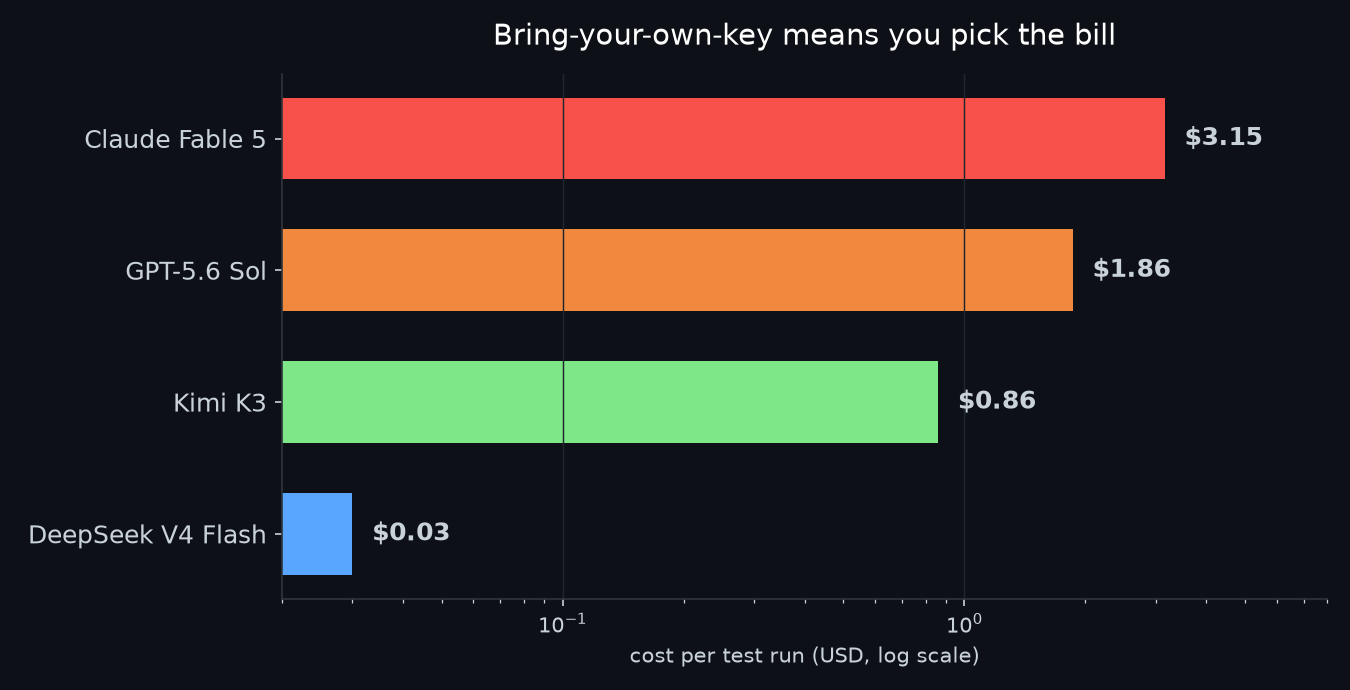
A 100x spread on the same app, same agent loop, same toolset. Source: Artificial Analysis (Aug 2026).
DeepSeek V4 Flash runs the whole harness at $0.03 per test. Kimi K3 at $0.86. GPT-5.6 Sol at $1.86. Claude Fable 5 at $3.15. That's the part that makes Minis interesting for people who don't want to pay $20/month for a wrapper: pair it with DeepSeek, Kimi, or a Qwen endpoint, and the bill is pocket change. The app itself is $0 with no subscription.
There's also an Enhanced Cache mode for Anthropic models (1-hour prompt cache at 1/10 price) and a cache hit-rate readout in the token usage sheet. If you're an agent power-user, the knobs are all there.
The cited review and user reports
The press reaction has been almost uniformly glowing, which is rare for an indie app:
"the most impressive indie app I've seen in a while" — and notably, "a more effective, elegant, and stable harness than OpenClaw" for this kind of work. Viticci has replaced Siri AI's text chatbot with Minis entirely.
- MacStories (Federico Viticci) — quote above. He's been running it with GPT-5.6 Sol and Kimi K3.
- Tao of Mac (Rui Carmo) — "a brilliant inversion": using CLI tools as the internals of an iOS agent is much closer to what Siri AI ought to be.
- Zhihu (Chinese tech community) — "largely realizes — and partially surpasses — Apple Intelligence."
- App Store reviews — "I've trialed essentially every open source and paid subscription AI agent app for iOS, and OpenMinis is hands down the best." Several reviewers call out stability: no crashes per session, which they say is rare among the alternatives.
- The Korean community picked up on the same point as me: the difference isn't the model, it's the harness — the tools you hand the model.
The complaints are mostly polish: the reasoning picker UI is awkward, thinking blocks can't be collapsed by default, VoiceOver (screen-reader) support is weak, and long sessions get sluggish past ~80k tokens. One blind reviewer gave 4 stars and said they'd bump it if VoiceOver got fixed — a fair criticism, and hopefully it lands soon.
Checks before installation
- It's not a magic phone-controller. No cross-app UI automation on iOS. Android gets the full thing; iPhone gets deep-but-sandboxed access. Both are useful; only one matches the hype.
- The app is young and moving fast. Updates land weekly on TestFlight, slower on the App Store. Bugs exist; the changelog is a long list of fixed crashes. That's the price of an indie project on the bleeding edge.
- Background work needs a trick. iOS will suspend the app; the workaround is a "Background Audio Keep-Alive" setting that plays silent audio. It works, but it's a workaround.
- Local LLM servers work but have a TLS gotcha. Point it at your local OpenAI-compatible server with
http://, nothttps://— several users hit TLS errors exactly because of this. - Your API key, your bill. The app is free because it's a harness. If you plug Claude Opus into it and let it run wild, you'll feel it. Start with a cheap model.
Choose the permissions and model route
The app brings shell tools, framework access and an agent loop into one iOS environment. 'On-device' accurately describes some components, but should not be extended to every prompt and result when using a remote model. Data sent to the chosen endpoint is governed by that provider's terms as well as the app's behavior.
Its useful scope is the actions exposed through supported APIs and permissions. It does not provide unrestricted control over other apps' interfaces. Evaluate it against a concrete task such as a calendar query or an authorized file operation, rather than a general 'iPhone controller' claim.
This article is based on the cited documentation and review. It does not include a month-long personal-use test. A future usage report would need to identify the app version, model provider, permissions and any failed actions.
Related on this blog: Nvidia Is Buying the Home of Open Weights in a $12.9B Deal · Ox Alpha Is Free on OpenCode. Is It MiMo or GLM?
Open Minis — free on the App Store (iOS 16+, iPadOS, macOS Apple Silicon, visionOS) · open source (GPLv3) · openminis.app
Comments
Post a Comment