Apple HomeView: A Shared Screen Needs a Regular Job
HARDWARE & DESIGN
Apple HomeView: A Shared Screen Needs a Regular Job
A household display earns its place by being available when a phone or tablet is elsewhere. HomeView's $299 starting price makes more sense against that daily job than against a list of iPad specifications. Calls, door access and home controls are the comparison I would start with.
In this article
HomeView makes the strongest case as a shared household dashboard. I would consider it for an Apple household that regularly uses home controls, calls and shared routines. If the job is reading, drawing or carrying apps around, I would keep the iPad. This is an analysis of the launch documents, not a hands-on review; the announced availability begins November 13.
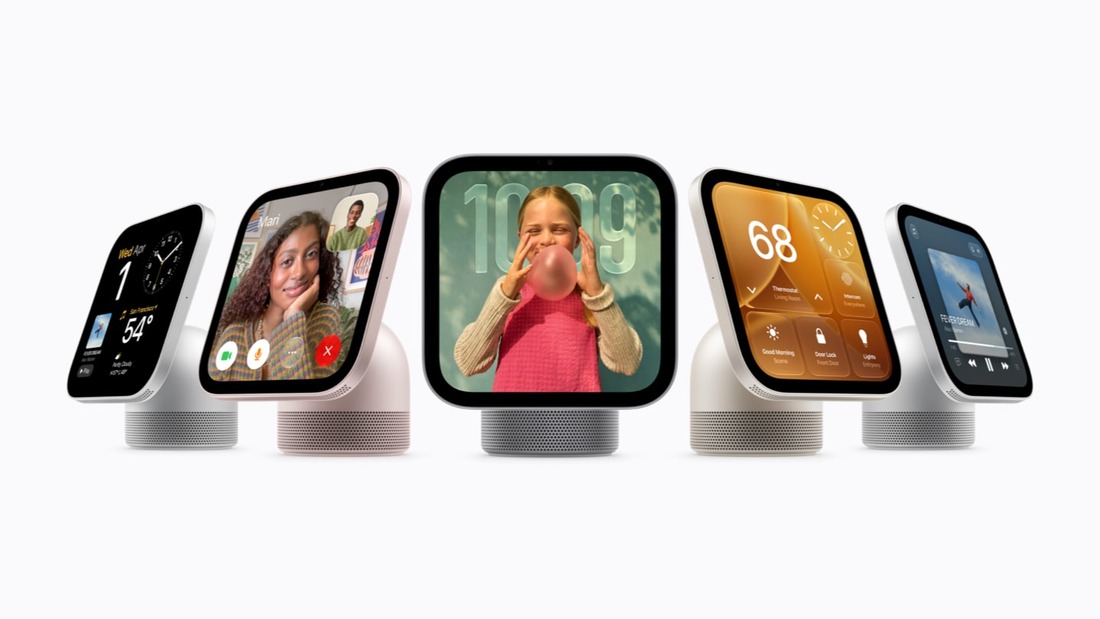
A screen the household can find
The HomeView product page describes a 7-inch display that recognizes up to six people, with a selection of Apple apps and compatible third-party audio and video apps. That is a focused product description. It is not a promise that every iPad app belongs on this screen.
Keeping the screen in one room is a practical advantage. A tablet can show a recipe, but it may be in someone’s bedroom when dinner starts. A phone can operate the lights, but its owner may be out. HomeView’s appeal rests on making those familiar controls consistently available to everyone at home.
Think about a normal evening: one person checks a delivery camera, another starts music, and somebody else checks a timer. HomeView is appealing if those handoffs stop requiring a borrowed personal device. It is less appealing if your household already handles them comfortably. An extra screen can add clutter just as easily as convenience.

The companion-device requirements
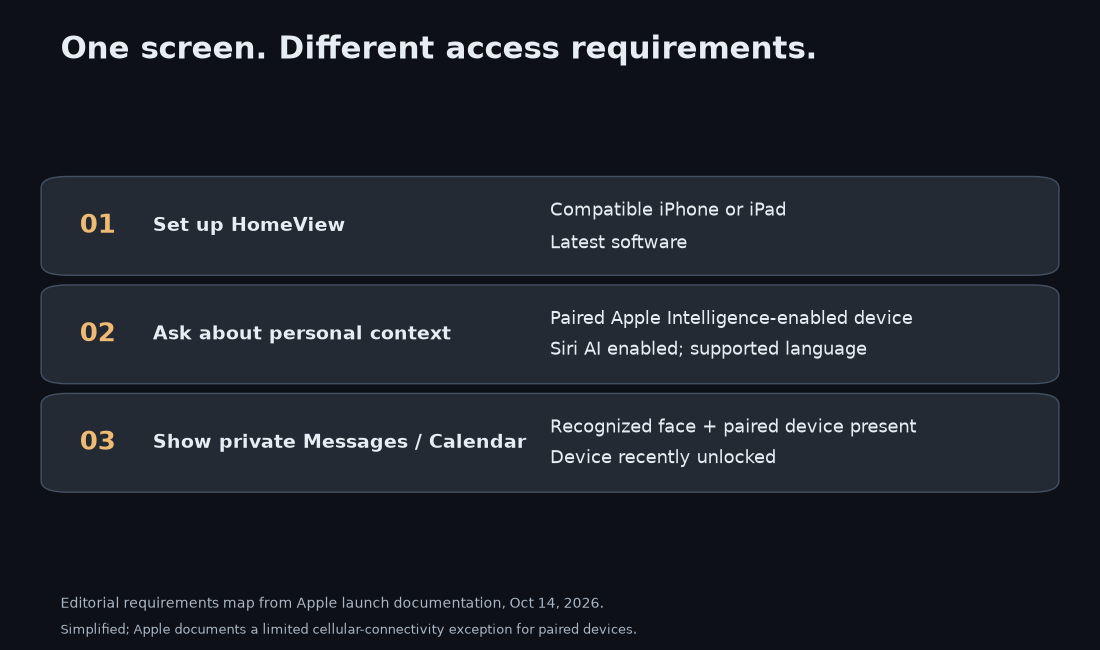
There are different requirements for different jobs. Apple’s launch footnotes require a compatible iPhone or iPad for setup and multiuser support. Personal-context requests require a paired Apple Intelligence-enabled device, with Siri AI enabled and a supported language. Those statements should not be collapsed into “buy the screen and every family member gets the full AI experience.”
The product page’s privacy explanation says private content appears when HomeView recognizes the person and their paired device is on the same Wi-Fi network and recently unlocked. Apple also documents a cellular-connectivity exception with additional conditions. Face recognition alone is not the full access rule.
That design creates a useful boundary between a household appliance and somebody’s messages. It also gives me a concrete question for the first real reviews: does the intended person get the right information quickly, without thinking about the companion device? A safeguard can be well designed and still introduce friction. We do not have to assume either perfect convenience or constant failure before testing it.
The wall-mount bill
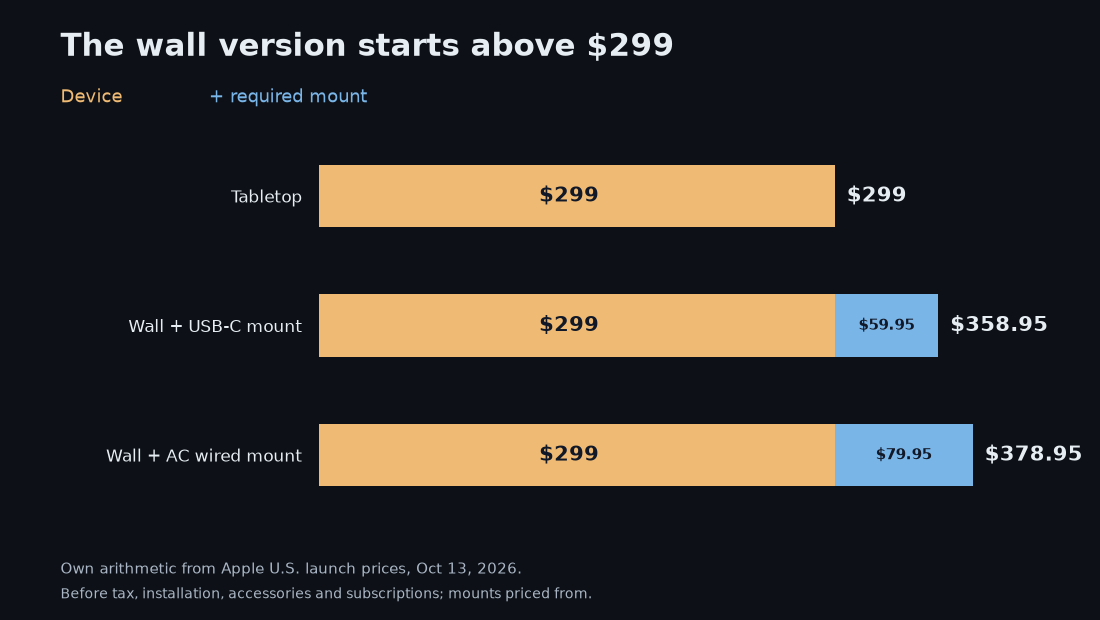
Apple lists both HomeView versions at $299 in the U.S. The wall-mounted version needs a separate mount. The announced mount prices start at $59.95 for USB-C and $79.95 for AC wiring. My arithmetic gives $358.95 and $378.95, before tax and installation.
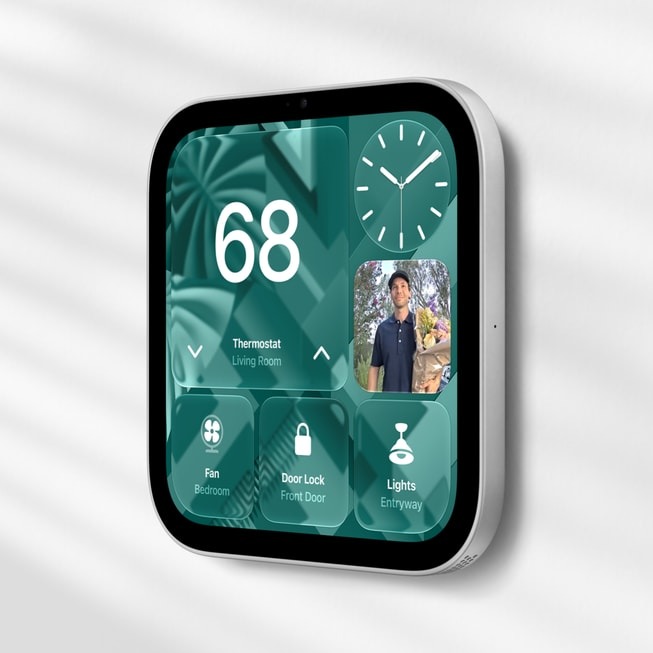
I would choose the location before choosing the version. A wall screen can be easier for several people to approach, while a tabletop screen is easier to reconsider after a week. Paying for an installation before learning where the household actually wants the screen is an avoidable experiment. The accessory budget also matters more if you are starting with no compatible home devices.
Siri AI and the subscription limit
Apple’s HomeView announcement labels Siri AI as beta, initially in English in the announced markets. Its footnotes say certain server-backed Apple Intelligence features have daily limits and that expanded access will be offered for a fee. Apple’s usage-limit support page also describes future paid access, while the usage terms allow limits to change. The checked documents do not give a fixed numerical daily quota or a paid-access price.
I would not turn that into a claim that every timer needs a subscription. The documents distinguish server-backed AI features from the rest of the device. But I would not treat the purchase price as a lifetime allowance of unlimited advanced AI either. Hardware ownership and service capacity are different things to budget for.
This is where launch-day enthusiasm can run ahead of usefulness. A beautifully placed screen still depends on the services behind the feature you want. Before ordering, I would identify the actual daily job, then check its language, device and service requirements. A generic promise of “AI for the home” does not answer those questions.
Tasks better suited to an iPad
An iPad’s broader app and accessory ecosystem is a strong reason to keep using one when the screen belongs to a person. HomeView’s case gets better when the screen belongs to a room. The comparison is about the job you are trying to simplify; a bigger checklist of features would miss that.
| Daily job | HomeView’s case | iPad’s case |
|---|---|---|
| Shared home controls and glances | A permanent, familiar location | Useful if an existing tablet already stays there |
| Reading, drawing and personal apps | Check the supported app scope first | Broader personal-device role and accessories |
| Household coordination | Designed around multiple recognized people | Convenient when one person is handling the task |
A spare iPad is also a sensible way to test the habit before buying anything. Put it where HomeView would go and see whether anyone naturally uses a household screen. That experiment will not reproduce HomeView’s recognition or hardware, but it can reveal whether the proposed location has a purpose. I would rather discover an unused corner with a device I already own.
A household already using Apple home controls has a clearer reason to consider HomeView than one buying a smart-home setup from scratch. The display should reduce an existing inconvenience. Adding devices and subscriptions to find a use for it reverses that calculation.
Before buying, look for shipping-unit reviews of person recognition, companion-device requirements and Siri during ordinary household use. Those tests will be more useful than another specification comparison. For reading, drawing or carrying a screen between rooms, the iPad remains the more flexible choice.
I covered the earlier Siri rollout in Siri AI Is Actually Good — Once You’re Off the Waitlist. HomeView gives that assistant a shared address.
Comments
Post a Comment