EmbeddingGemma 2: Search the Archive You Actually Have
MODELS & COSTS
EmbeddingGemma 2: Search the Archive You Actually Have
A remembered event might be stored in a photo, an audio clip or a text note. EmbeddingGemma 2 offers components for searching across those formats locally. The first decision is which formats the archive needs, before loading the largest configuration by default.
In this article
Google’s EmbeddingGemma 2, announced on October 6, 2026, is interesting for that reason. It puts text, images, video and audio into one local search system. The model scales from a 270M text configuration to 740M for all modalities, with Apache 2.0 licensing. That makes it a useful building block for searching a mixed personal archive. Google’s announcement.

Image: Google DeepMind. EmbeddingGemma 2’s official model banner.
An embedding turns content into a numerical representation that can be compared with other representations. Your application ranks nearby matches, then opens the source or passes it to a separate answer-generating model. That distinction matters: a good match helps you find evidence; it does not prove the answer is correct.
Imagine remembering a repair video by its subject but forgetting its filename. A useful search system should retrieve the relevant clip without requiring you to remember the exact words somebody used. I would judge this release by how well it handles that kind of everyday retrieval problem.
Four formats in the retrieval stack
| Feature | Generation 1 | Generation 2 |
|---|---|---|
| Inputs | Text | Text, images, audio, video |
| Parameters | 308M | 270M text / 740M full |
| Text context | 2,048 tokens | 8,192 tokens |
| Output dimensions | 768, 512, 256, 128 | 768, 512, 256, 128 |
Source: Google’s version overview. The context ceiling is four times larger. The flexible vector dimensions already existed; native multimodal input is the bigger change.
This is also different from taking a photo, generating a caption and searching the caption. An intermediate description can miss a small visual detail. A speech transcript can drop a non-speech sound. Direct multimodal retrieval gives developers another path, although it still needs testing on the material people actually search.
Text-search gains in the published results
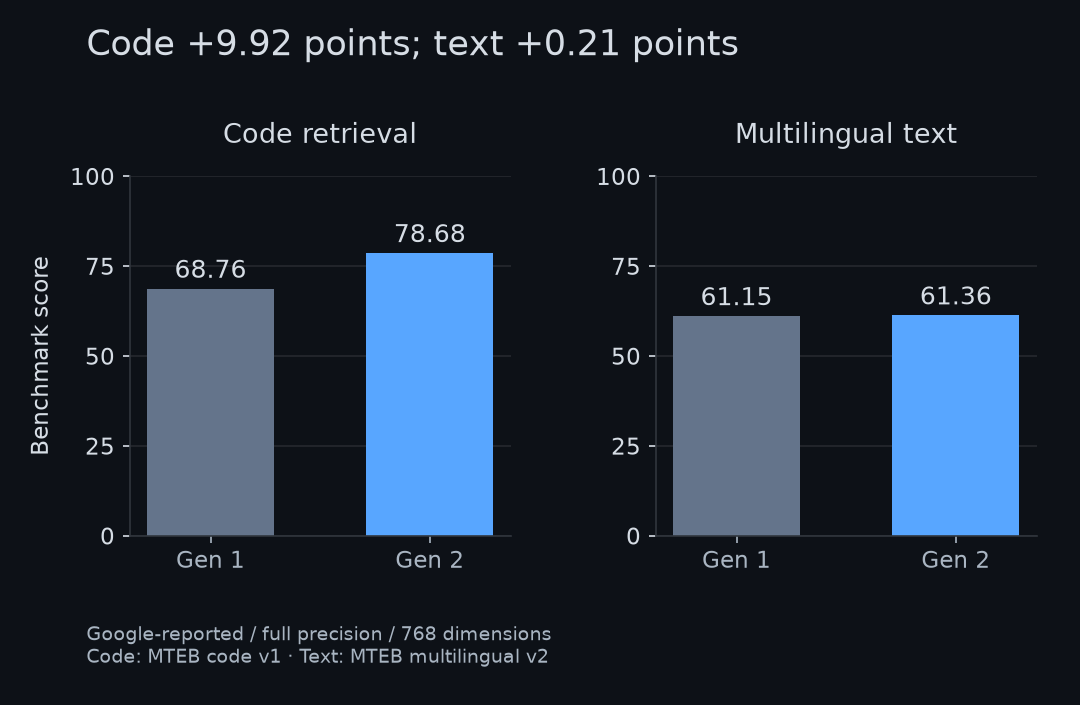
Google-reported results, redrawn by Open Source Factory. Each panel compares generations within the same benchmark; the two panels measure different tasks.
Google reports 78.68 versus 68.76 on MTEB Code v1 and 61.36 versus 61.15 on multilingual MTEB v2. These are full-precision, 768-dimensional results. Official model card.
My arithmetic puts the code increase at 9.92 points, or about 14.4% relative. The multilingual increase is 0.21 points. I would describe this as a substantial code result alongside nearly unchanged aggregate text performance.
That gives different readers different reasons to care. A codebase search tool has a concrete new result to evaluate. A document-only search system that already works well has less reason to migrate immediately. Multilingual averages also leave plenty of room for differences between languages and document types.
For a migration trial, I would keep the same documents and queries, then inspect which correct results appear near the top. Include similar-looking wrong answers and queries that should return nothing. Those failures reveal more than a few flattering examples from the launch.
Choosing which components to load
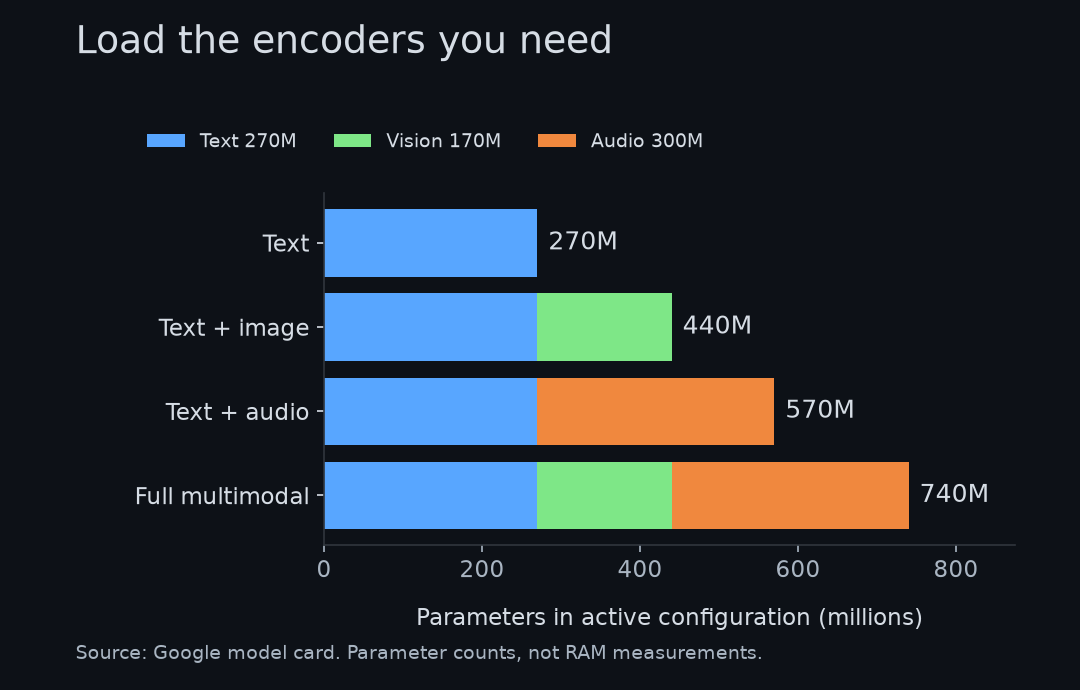
Google-reported modular parameter counts, redrawn by Open Source Factory. Image and video inputs use the vision encoder.
The model is modular. Text uses 270M parameters; adding vision takes that configuration to 440M, adding audio instead takes it to 570M, and loading everything reaches 740M. Encoder configurations.
A parameter count describes the model components, while memory use depends on numerical precision, runtime and input size. The default Python loader brings in all modalities; a text-only application should explicitly disable the unused encoders. Google’s initialization guide.
The tiny-memory headline needs its setup attached. Google quotes approximately 191MB of active RAM for text-only weights and 567MB for the full model with quantization on a Pixel 11 Pro. Those are vendor-reported weight-memory figures, rather than a guarantee for an entire application. Google AI Edge deployment report.

Image: Google Store, Pixel 11 Pro product photo. Google’s quoted memory figures use this phone model with quantization; this is product imagery.
Meanwhile, the published model.safetensors file is 1,488,915,288 bytes, about 1.49GB in decimal units. I checked the repository file metadata, without downloading the weights. Public weight files.
A download, resident weights and peak application memory are different budgets. An app also needs room for media decoding, temporary tensors and its search index. I would measure the complete retrieval operation on the target device before advertising a minimum RAM requirement.
Vector size and the quality loss
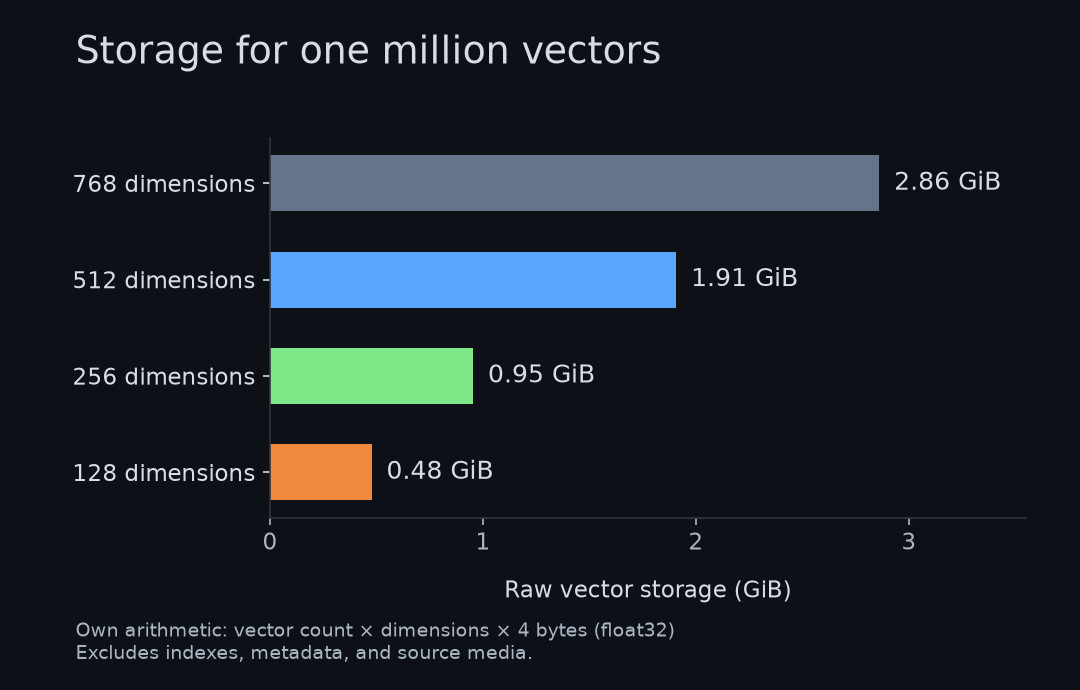
Own arithmetic for one million float32 vectors. This counts only vector payload bytes; index structures, metadata and original files are extra.
Matryoshka Representation Learning lets you keep the leading dimensions of a vector. For one million float32 vectors, I calculate 2.86GiB at 768 dimensions and 0.48GiB at 128. The ratio is exactly six. It does not mean that the entire database, or the model itself, becomes six times smaller.
The model card gives a useful reality check:
| Dimensions | Multilingual MTEB v2 | MMEB v2 overall |
|---|---|---|
| 768 | 61.36 | 59.01 |
| 256 | 60.41 | 56.24 |
| 128 | 57.89 | 45.65 |
Source: Google’s vector-truncation evaluation. Vendor-reported, full-precision checkpoint.
My subtraction gives a 2.77-point MMEB drop at 256 dimensions and a 13.36-point drop at 128. A mixed-media archive has a stronger reason to test 256 before jumping to the smallest option. Whether that loss matters depends on which mistakes your application can tolerate.
Truncated vectors need normalization, and queries and stored items must use the same dimension. Changing an existing index also needs care: vectors from the old embedding model should not be treated as interchangeable simply because their length matches.
A mixed-media archive as a first project
A personal media archive is my first candidate. Index the files once, store their locations alongside the vectors, then let a query return the most relevant items. Keep the original files accessible so a user can inspect the result rather than trust a detached label.
Google has concrete demos for this: Instant Media Search and Video Moments Finder in AI Edge Gallery. They demonstrate local media retrieval and finding matching moments in a video. Official demos and implementation paths.
For an organization, a more useful first project might combine maintenance notes with equipment photos. An employee could look for the relevant procedure using either a description or an image. That is my proposed application, not a result Google has measured for a particular workplace.
Long recordings still need segmentation. Google’s multimodal guide describes a shared 8,192-token input budget, with default video sampling at one frame per second. A single vector for an entire recording would also be a poor way to locate one short event. Preserve timestamps when indexing clips. Multimodal input guide.
I would also keep access rules attached to retrieved files. Running embeddings locally can remove one reason to upload data, but a cloud answer model, synchronization service or application log can still move that information elsewhere. The privacy benefit depends on the whole pipeline.
Starting with a smaller configuration
The repository specifies sentence-transformers>=6.1.0. Use a Transformers version that supports this architecture and follow the current installation guide. Repository requirements.
pip install -U "sentence-transformers>=6.1.0" transformersHere is a text-only reference example adapted to use CPU float32 and 256-dimensional normalized vectors. I have checked its syntax and configuration against the documentation; I have not run the model on this computer.
import torch
from sentence_transformers import SentenceTransformer

model = SentenceTransformer(
    "google/embeddinggemma-2",
    device="cpu",
    model_kwargs={"torch_dtype": torch.float32},
    config_kwargs={"vision_config": None, "audio_config": None},
)
options = {"truncate_dim": 256, "normalize_embeddings": True}
queries = model.encode(
    ["Find the procedure for replacing a broken part"],
    prompt_name="SearchQuery", **options,
)
documents = model.encode(
    ["A maintenance guide explains how to remove and replace parts."],
    prompt_name="Document", **options,
)
print(model.similarity(queries, documents))
Google warns against float16; use bfloat16 on supported hardware or float32. Search queries and documents also use different task prompts. Precision and prompt guidance. A similarity score is a ranking signal, so avoid presenting it to users as a calibrated probability.
A mixed-format archive or a code-retrieval bottleneck is a sensible place to evaluate the model. Build a small collection with known answers and check whether the desired source file reaches the results. That reveals more than a demonstration built around an easy query.
For a text-only system, use its existing retrieval failures to judge a migration. The launch results do not establish a large text-quality improvement, and smaller vectors lose some quality. Record those trade-offs on the archive that the application will actually search.
Comments
Post a Comment