GPT-6.1 Terra: What It Does, Who Gets It, What It Costs
GPT-6.1 Terra: What It Does, Who Gets It, What It Costs
The detail I kept coming back to in the Terra launch was where you can use it. GPT-6.1 Terra arrived on October 26, but looking for it in ordinary Chat will get you nowhere. It is available in Work and Codex. That distinction tells you a lot about the job OpenAI wants it to do. The official rollout note places images, screens and actions together.
My interest is practical: can it read something on screen, make the right change, and leave a result I can verify? The release makes Terra worth trying for that loop. It does not, by itself, establish how reliably Terra completes your own work. This is a source-based launch analysis, with my own cost calculations and a proposed test protocol, rather than a hands-on review.

Where can you actually select GPT-6.1 Terra?
OpenAI lists Plus, Pro, Business, Enterprise and Edu for the Work/Codex rollout. In the desktop app or Work on the web, open Advanced and select Terra from the model list. Work also supports it on mobile. Enterprise availability depends on workspace access and administrator controls. The release excludes Chat and UAE inference residency. These are rollout conditions, not a promise that every account screen will look identical. Check the current release note.
CLI users get a concrete requirement: the models guide says Codex CLI 0.159.0 or later is required. The launch command is short:
codex -m gpt-6.1-terraAPI access is a separate route. The October 26 API changelog lists both Responses and Chat Completions. For a tool-using integration, use Responses: the GPT-6 guide explicitly says tool calling requires it. Having a ChatGPT plan and making metered API requests are different ways of using the model; the token prices below describe the API route.
What is Terra supposed to be good at?
OpenAI positions Terra around visual reasoning, computer use and clear writing. Its model-selection guide suggests screen-based work, concise drafts and scoped code fixes. It also recommends comparing the saved result and completion report, which is the part I would pay most attention to. A polished answer can conceal a form saved to the wrong record.
Here is a useful candidate task: take a supplier image and a product sheet, match the correct catalog item, and prepare an update. The difficult bit is often a tiny identifier, a similar color name, or an old tab with nearly identical fields. A good test keeps those ambiguities in the input. Removing every awkward detail makes the demonstration prettier and the evaluation less useful.
For writing, I would test a proposal based on a messy brief. The question is whether the draft preserves the client’s constraints, handles missing information honestly and needs fewer edits. Counting output words alone misses the point. A short answer can omit the one sentence the reader needed.

The tool setup matters. Computer Use documentation describes a desktop plugin for supported macOS and Windows regions, with app access and operating-system permissions. On Windows, it operates on the active desktop. The browser documentation describes a separate browser profile, so an existing login in your regular browser should not be assumed to appear there. Budget setup time before judging the model.
What does the API actually cost?
For Standard short-context requests, OpenAI lists Terra at $1 per million input tokens and $5 per million output tokens. Cached input reads are $0.05 per million. A 30-minute cache write is $1.25, and a 12-hour write is $2.50 per million. A cheap cached read does not make creating the cache free.
| API route | Input / 1M tokens | Output / 1M tokens |
|---|---|---|
| Standard | $1.00 | $5.00 |
| Flex / Batch | $0.50 | $2.50 |
| Fast | $2.00 | $10.00 |
Take a deliberately simple workload: 20,000 uncached input tokens and 2,000 output tokens per request. The Standard text-token charge is $0.03 per request, or $30 for 1,000 requests. Fast makes that $60. Flex/Batch makes it $15, but asynchronous or flexible processing is a different operational choice from a person waiting for the next screen action. These are rate calculations, not measured Terra bills.
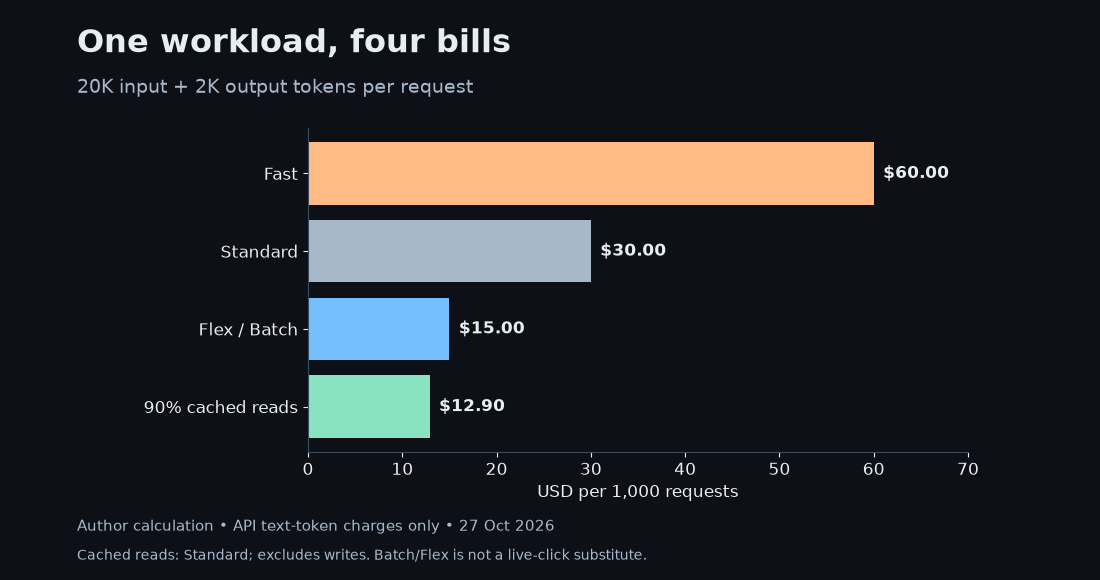
If 90% of that input is already cached, each Standard request costs $0.0009 for cached reads, $0.002 for uncached input and $0.01 for output: $0.0129 total. That becomes $12.90 for 1,000 requests, before cache writes. It is a useful steady-state scenario, not a guaranteed saving on the first run. Screenshot-heavy work also needs its own image-token accounting and tool-cost check.
Why does the 272K boundary matter?
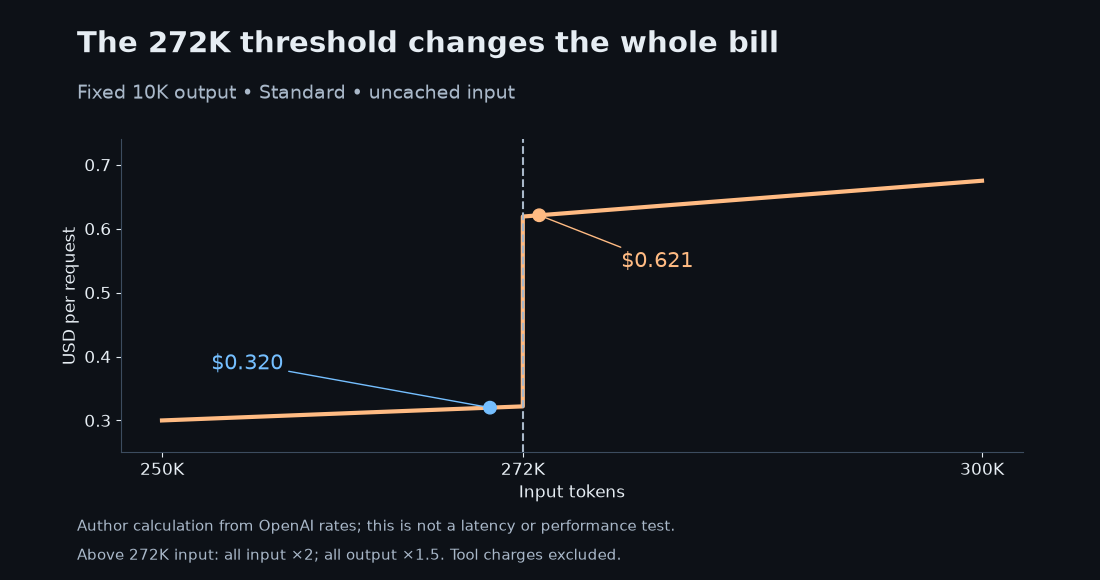
The Terra model page gives a 1,050,000-token context window and a 128,000-token maximum output. It supports text and image input, with text output; native audio and video are not supported. The important billing footnote is smaller: above 272K input tokens, the full request uses double input/cache rates and 1.5 times output rates.
Hold output at 10,000 tokens. A Standard request with 270,000 uncached input tokens costs $0.320. Raise input to 273,000 and it costs $0.621. That is about 94% more for roughly 1% more input, because the whole request crosses the pricing boundary. This is why I would trim irrelevant history before treating a million-token window as the default workspace.
A larger window can still be worth paying for. If keeping an essential drawing in context avoids a failed update, the extra tokens may be the cheaper choice. I would first remove duplicate screenshots, obsolete tabs and repeated instructions. Keep the evidence that changes the decision. Token trimming that destroys the evidence is a false saving.
How would I test it before moving real work?
I would build a small, repeatable trial with ten representative tasks. Keep a clean source set, a copy of the target records and a written success condition for each task. Include unreadable labels and near-duplicate entries. An honest request for clarification should count differently from a confident but wrong edit. This is my proposed protocol; I have not run these ten tasks on Terra.
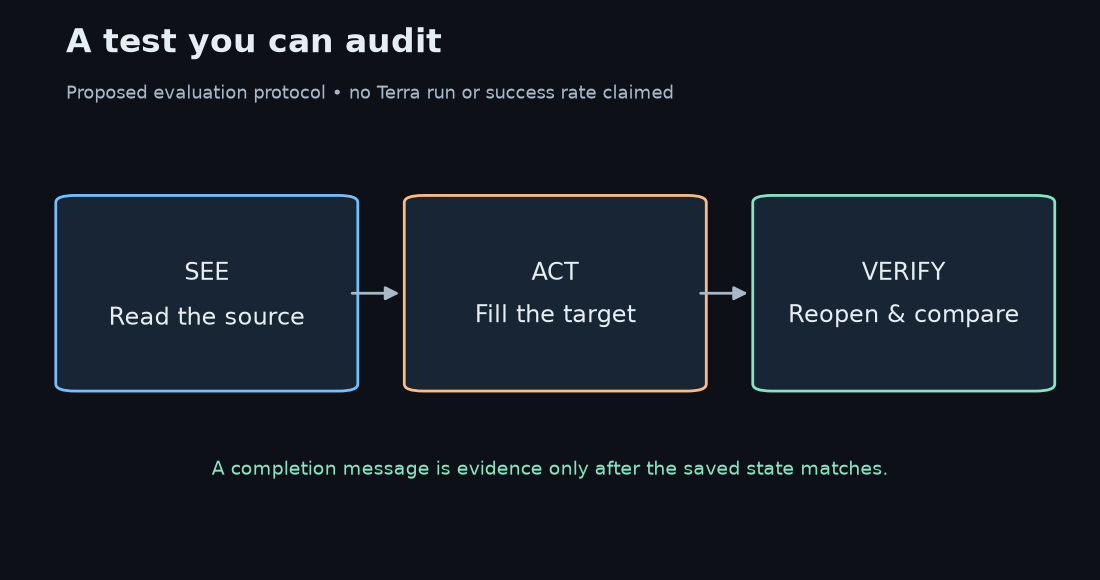
For each run, record elapsed time, billed tokens, retries, corrections and human review time. Reopen the destination and compare names, numbers and fields with the source. If the agent says it saved a change, check the saved record. If it flags an uncertain value, see whether the uncertainty survives into the final report. The final artifact and the explanation both matter.
Even a tiny rate can be outweighed by review. At an assumed $20 an hour, thirty seconds of checking costs about $0.167, over five times the $0.03 text-token example. That wage and review time are illustrative assumptions. They explain why my main question is how much checking remains after the task finishes.
Retries also change the math. In a simplified model with independent, equally priced attempts and repeat-until-success, expected API cost is attempt cost divided by success probability. At an assumed 80% success rate, $0.03 becomes $0.0375 per successful result. Real failures may be correlated, and repeated attempts can carry more context. I would log the actual attempts rather than rely on that toy formula.
My take
Terra is interesting because its stated role maps to a familiar pile of work: understand a visual source, make a bounded edit and explain what changed. The official pages I checked did not provide a Terra-specific comparative benchmark table or a reproducible end-to-end timing test. I cannot turn the words “fast” and “precise” into a measured speedup or a win over Sol.
I would start with a task that has a visible finish line: a corrected listing, a revised proposal or a checked form. Then score the saved result and the time spent reviewing it. If Terra makes that loop cheaper and easier, it has earned a place. The launch announcement gives a reason to try; your own completed jobs decide whether to keep it.
Related: our earlier GPT-6 Sol and Luna analysis. That post provides background on the family; Terra’s current specifications and rates come from the sources checked for this article.
Comments
Post a Comment