XREAL AURA for Work: What You Actually Need to Carry
XREAL AURA for Work: What You Actually Need to Carry
The little computer on AURA’s cable is the part I keep coming back to. It takes the battery and much of the processing off your face. It also means the portable office has more than one piece to pack.
XREAL AURA can run Android XR apps through its computing puck and bring a laptop display into that workspace as one window. That is a useful combination for travel. Whether it can replace your usual setup depends on text clarity, input devices, charging and the apps your job needs. This is a launch analysis from official documents; I have not worn or tested the hardware.
What does AURA put on your desk?
Google opened orders on October 28, 2026 in the United States, Canada and Korea. Its announcement lists Japan for November 2. Shipping is expected to start in batches in mid-November, according to XREAL’s shop; an open order page does not mean immediate delivery. Google’s launch announcement · Current shop and shipping terms.
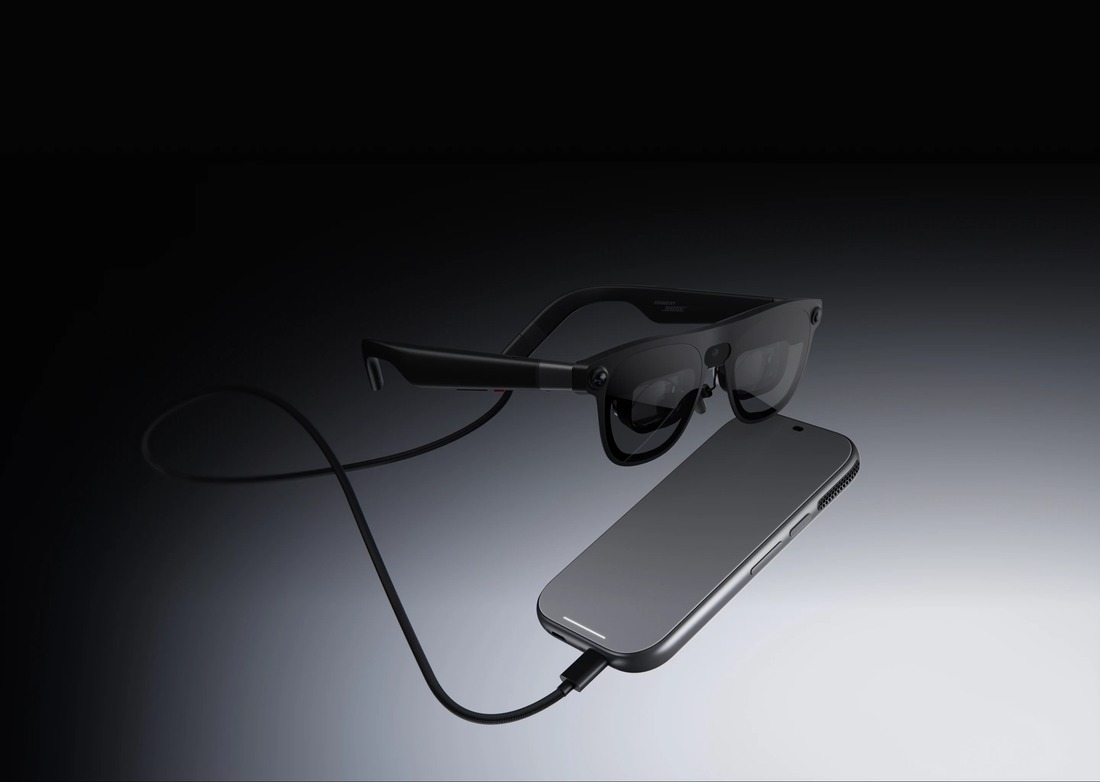
The lenses are optical see-through: you look directly at the room while digital content is placed over your view. The frame has its own X1S spatial coprocessor. The tethered puck runs Android XR on a Snapdragon Reality Elite platform and carries the battery, connectivity and touchpad. The design distributes the work between the two pieces. XREAL specifications.
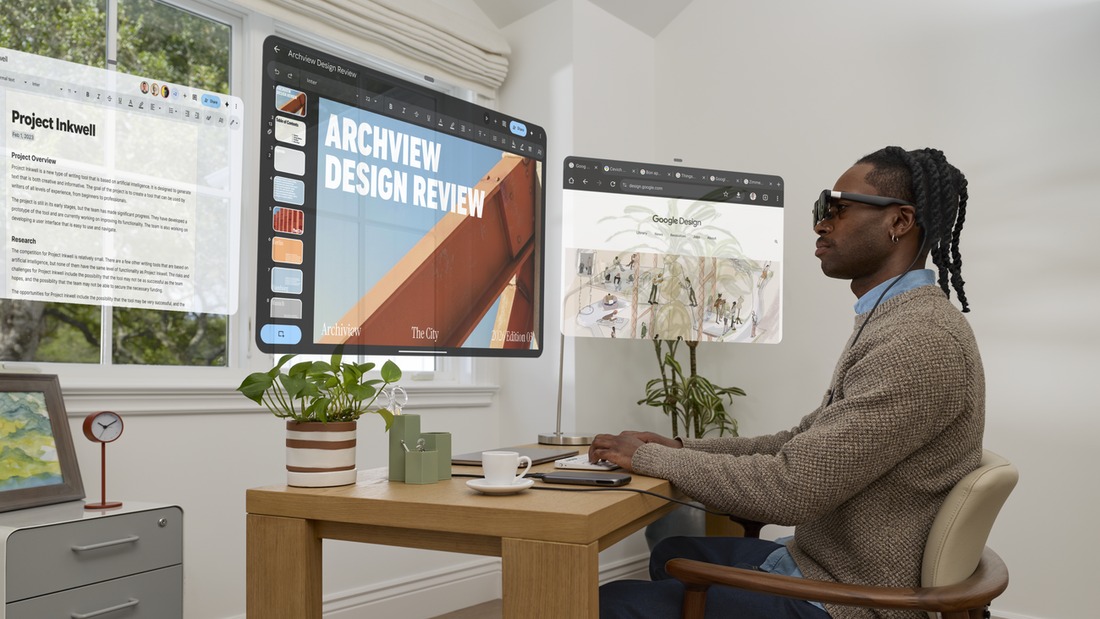
That gives AURA a use case I find easy to picture: a browser, a document and a communication app arranged around a small hotel desk. Those are Android applications running on the puck. A familiar desktop program still needs its appropriate host or a separately supported remote workflow; putting its picture in glasses does not turn an Android app into the Windows or macOS version.
How much of the office do you carry?
XREAL lists 95 g for the glasses and 265 g for the computing puck. Adding the two specified masses gives 360 g, before cables, a case or input accessories. I calculated that sum from the specifications. It is neither a measured travel-kit weight nor a statement that 360 g rests on your head.
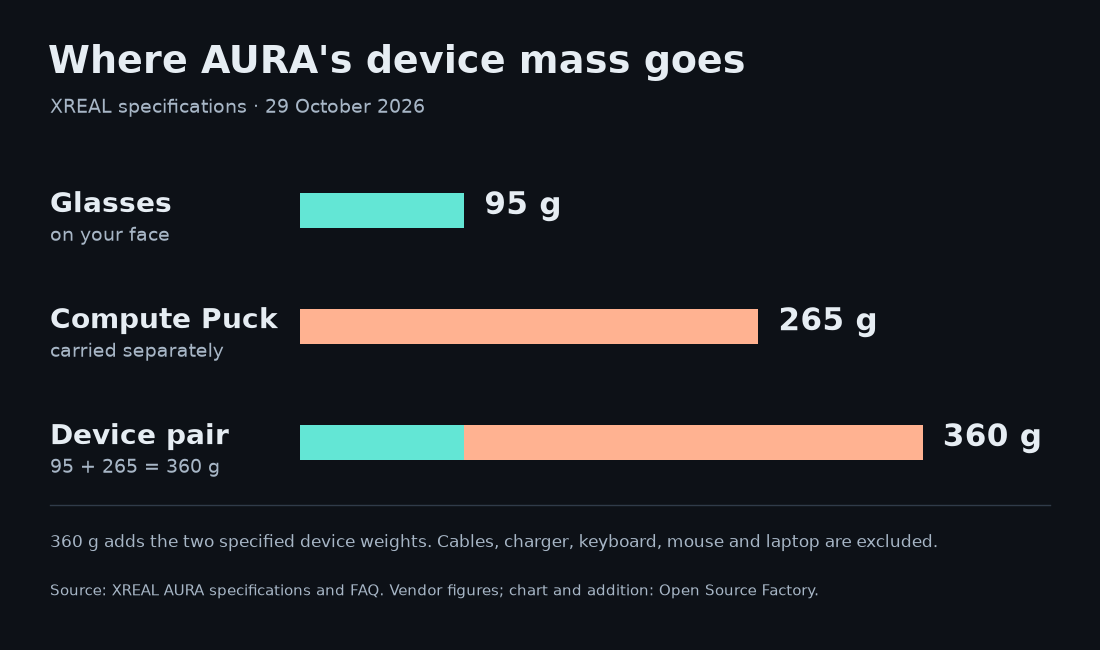
Moving battery and computing mass away from the frame is a sensible reason to accept a cable. The practical question is where the puck goes while you work. A pocket, a table and a seat tray put the tether in different places. The official specification also lists active fan cooling, so I would check airflow and audible fan noise during an actual document session rather than assume a pocket is always the right home.
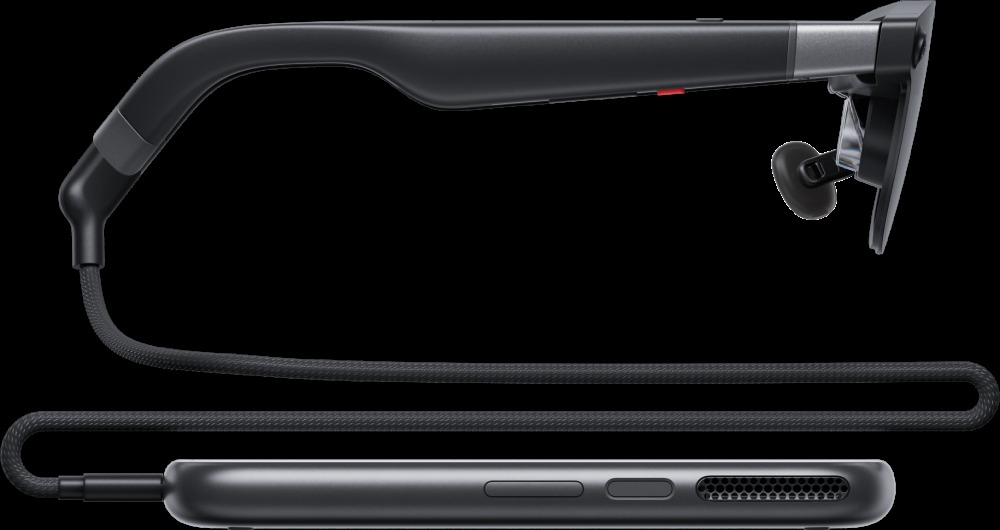
The base package includes the puck; it is not a second computer you must buy separately to obtain Android XR. A keyboard and mouse are a different matter. The puck’s touchpad, hands and voice can handle interaction, but I would bring familiar typing tools for a long writing session. That adds space and weight even when the display itself is light. Box contents and accessory bundles.
How many laptop screens does it actually give you?
This is the distinction I would settle before ordering. Native Android XR apps can occupy separate windows. Google describes Wired Mirroring as bringing the laptop’s picture into a resizable window alongside those apps. Several windows in the workspace do not establish several independent external monitors supplied to Windows or macOS. Google’s workspace description.
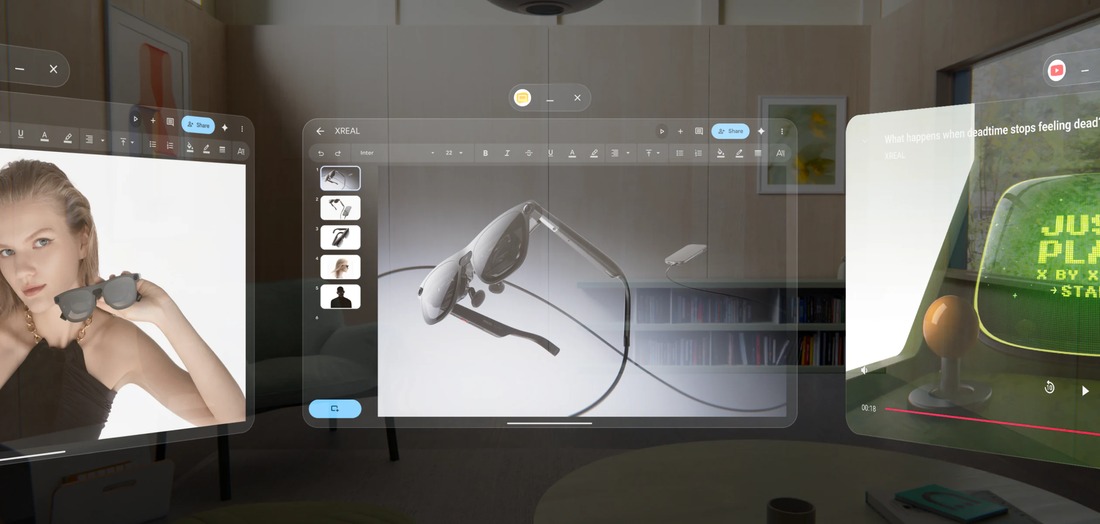
There are also two ways to connect an external source. With the puck, the source’s video goes into Android XR through the puck’s charging/DP-in port. Without it, compatible USB-C DisplayPort devices can power the glasses directly as an external display. In direct mode, the source can mirror or extend its desktop according to its display settings; Android XR apps and Gemini on the puck are absent. The glasses still have their own on-screen Anchor/Follow controls. Official connection instructions.
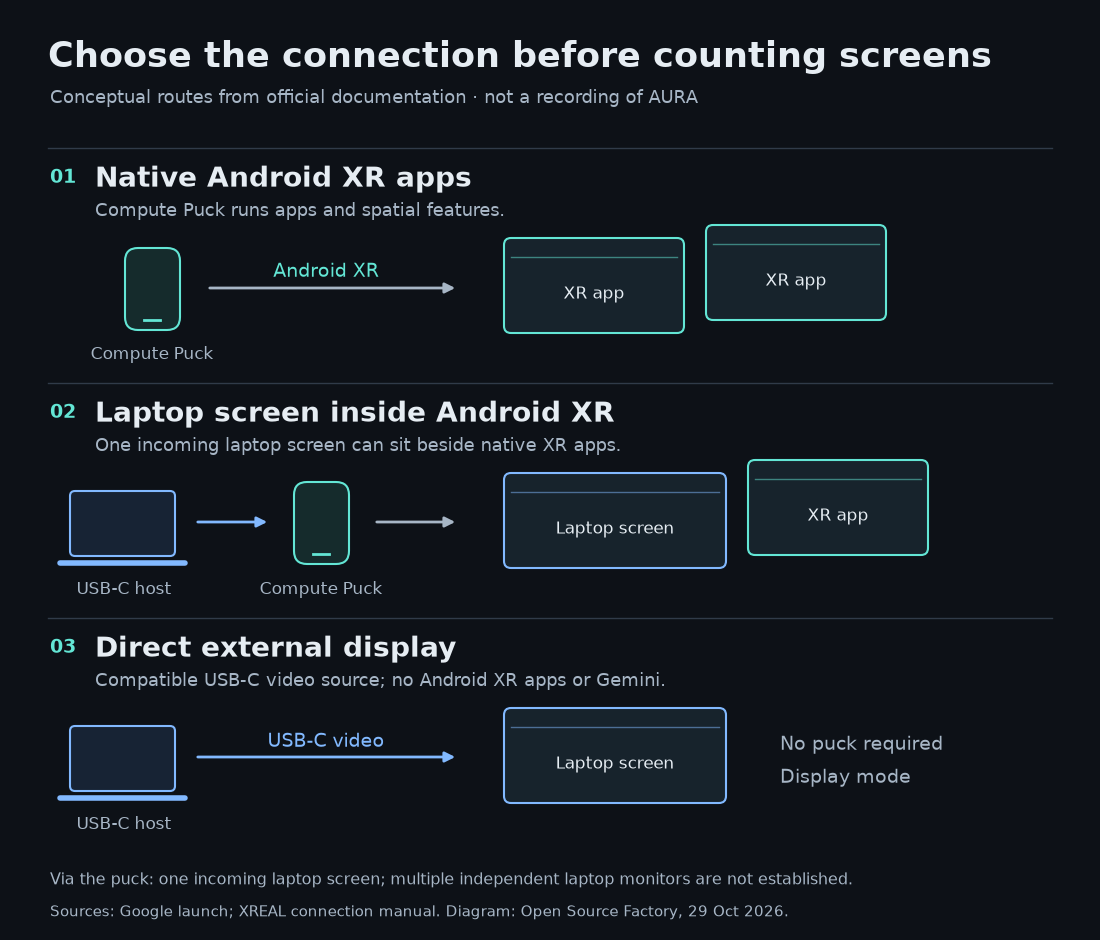
The connection manual adds a small detail with a large effect on packing: the included USB-C charging cable does not carry DisplayPort video. For laptop-to-puck video, supply a video-capable cable or a suitable adapter and verify that the laptop port outputs video. Operate the computer with the computer’s own keyboard, mouse or controller. Receiving its picture does not establish that the puck’s touchpad controls it. Cable and input requirements.
For a trip, I would choose the route before packing. Android browser-and-document work needs the puck and its app workflow. A full desktop application needs the laptop as well. A simple external display session may let the puck stay in the bag. That choice changes the total kit more than counting virtual windows does.
Will a big virtual screen make small text comfortable?
The current product page lists a 70° field of view, 1920 × 1200 pixels per eye and refresh rates up to 120 Hz. These are manufacturer specifications, not our measurements. More apparent screen area does not create more physical pixels: enlarging a window and arranging several windows still use the display’s available visual field. Display and fit specifications.
A film, a web page and a dense spreadsheet ask different things of those pixels. I would bring a document with my normal font size, scroll it, inspect the edges and read for a sustained session. That would answer more than an enormous advertised virtual diagonal. It would also check how much head movement the layout asks for.
Fit comes before that test. XREAL offers M frames for a listed IPD range of 60–66 mm and L for 66–72 mm. Its troubleshooting guidance points to fit, nose pads, software IPD and corrective lenses when images are blurry or cropped. I would measure IPD and confirm prescription options before choosing a size. The company’s comfort language cannot settle the result for an individual face. Official fit and troubleshooting FAQ.
That is the consumer question behind our earlier TDK reflector article: an optical component or a promising display specification still has to become a readable, well-fitting device. AURA now gives buyers a concrete product to evaluate against that standard.
Can it cover a workday?
XREAL’s FAQ estimates 3–4 hours of typical use from the puck and says it supports charging during use. Treat that as a vendor estimate, not a measured mixed-work result or an all-day promise. Brightness, apps and connected devices are reasons to test your own workload. The charging guide says a power adapter is not included, so my packing plan would include a compatible one and a realistic charging break. Battery FAQ · Charging guide.
Setup for Android XR requires a Google account and Wi-Fi; the direct external-display route has a different role. App and service connectivity should be checked individually. I would download the files I need and verify the intended workflow before relying on it away from dependable internet. Setup requirements.
Gemini can help with a shared view of your apps and surroundings. Google describes view sharing as a choice that shares the full view, and provides a way to stop it. A display that nearby people cannot easily read still does not make everything you share with an assistant local or confidential. For work documents, I would check the account settings and employer rules before enabling that feature. Gemini Live on Android XR · Gemini Apps Privacy Hub.
What does the launch price include?
As checked on October 29, XREAL’s US launch offer runs through the end of 2026. The memory and storage belong to the computing puck. Both configurations include the glasses-and-puck setup; the headline price should not be attached to the higher-memory version. Current configurations and offer.
| Puck configuration | US launch price | Listed regular price |
|---|---|---|
| 12 GB RAM / 256 GB storage | $1,099 | $1,279 |
| 16 GB RAM / 512 GB storage | $1,299 | $1,499 |
The launch upgrade costs $200 for 4 GB more RAM and twice the storage. Those capacity changes do not prove a particular improvement in speed or battery life. I would choose based on the apps and local content I expect to keep, rather than assume the larger configuration fixes an untested performance problem.
These are US dollar prices, with US taxes and applicable shipping determined at checkout. The shop lists a base Productivity Bundle with a keyboard from $1,178, which helps show that the keyboard is an added purchase. Korea is in the launch-order list, but its local promotional price and delivery terms should be checked in the official Korean store; a currency conversion is not a Korean retail quote. Mid-November is an expected shipping start, not a guaranteed arrival date. Shop prices, bundles and fulfilment terms.
My take
AURA makes the most sense to me as a portable Android workspace with the option to bring in a laptop. Moving much of the hardware off the face is a useful design decision, and keeping native apps beside a desktop picture could suit a cramped desk well.
I would decide on it by reproducing one real task: open the document, connect the keyboard, bring in the required desktop app, then see whether the text and tether remain comfortable. If the job only needs an external screen, I would evaluate direct display mode first. If it needs native Android apps and spatial interaction, the puck earns its place in the bag.
The documents establish the connection options and what the parts weigh. They leave sustained comfort, tracking in a particular room, text readability and actual working battery life for a hands-on session. Those are the results I would want before replacing a familiar travel setup.
Sources and scope
Google launch · Current XREAL specifications · US shop and shipping terms · Connection manual · Manufacturer FAQ · Setup guide · Gemini Live help · Gemini privacy controls
Original article, calculations, diagrams, motion graphics, music and sound design: Open Source Factory. Product photos and promotional visuals: XREAL, Google and respective rights holders. Specifications, prices, shipping and runtime claims are manufacturer/platform statements. No wear, optical or working-battery test was performed.
Comments
Post a Comment